
Garuda Linux in 2026: Editions, Install and What Ships

✅ Checked against Garuda's own repositories, wiki and ISO package lists · Last updated: 24 October 2026
Garuda Linux is a rolling-release distribution based on Arch Linux. It installs from a graphical installer, uses Btrfs with automatic snapshots you can boot from the GRUB menu, and adds Chaotic-AUR, a repository of prebuilt AUR packages. The default edition, Dr460nized, is KDE Plasma with a custom theme. The latest official ISOs are the 19 August 2026 builds (260819): ten editions between 2.12 GB and 4.64 GB.
The reviews that rank for Garuda Linux were published between 2020 and 2025 and several still describe Pamac, the Zen kernel and Timeshift. None of those is in the current ISO. This guide is built from what Garuda publishes itself: the package lists of the 260819 ISOs, its ISO profiles, settings and kernel repositories on GitLab, its changelog and its wiki. It covers which edition to pick, how to install it, what the system changes on your behalf, how updates and snapshots work, and who should choose something else.
Garuda Linux in short
- What it is: Arch Linux with a graphical installer, Btrfs snapshots in GRUB and ready-made desktops. Updates are rolling.
- Good fit: you want Arch packages and the AUR without building Arch by hand, and you accept a distribution that sets a lot of defaults for you.
- Look elsewhere: you want a low-RAM system, you plan to run it in a virtual machine, or you want to learn Arch by assembling it yourself with our Arch Linux installation guide.
- Garuda Linux at a Glance
- What Is Garuda Linux?
- What Older Garuda Reviews Get Wrong
- Which Garuda Linux Edition Should You Pick?
- System Requirements and What to Check First
- How to Download and Install Garuda Linux
- What Garuda Changes on Your System
- Updating Garuda: garuda-update, Not a Bare pacman -Syu
- Btrfs Snapshots and How to Roll Back
- Chaotic-AUR, the AUR and Flatpak: Where Software Comes From
- Garuda Dr460nized Gaming: What Is Inside
- Garuda Hyprland: Config File, Packages and Keybindings
- NVIDIA, Hardware Profiles and Secure Boot
- Garuda Nix: NixOS Next to Garuda
- Garuda vs CachyOS, EndeavourOS, Manjaro and Arch
- Garuda-Specific Commands
- Who Should Skip Garuda Linux
- Troubleshooting Common Questions
- What is Garuda Linux good for?
- Is Garuda Linux good for gaming?
- Which is better, Garuda Linux or CachyOS?
- How do I install Steam on Garuda Linux?
- Is Garuda Linux Indian?
- Is Garuda Linux good for beginners?
- What is Garuda Linux based on?
- What is the Garuda Linux repository?
- How do I update Garuda Linux?
- What are the most useful Garuda Linux commands?
- Where do I download Garuda Linux?
- Can I run Garuda Linux in VirtualBox or another virtual machine?
- pacman says "invalid or corrupted package" or a signature error. What now?
- garuda-health says I am not using the Garuda bootloader. Is that a problem?
- Does Garuda Linux support Secure Boot?
- What Was Not Tested, and Sources
Garuda Linux at a Glance
The short version, taken from the 260819 ISO package lists, the Garuda wiki and the ISO profiles:
| Item | Garuda Linux |
|---|---|
| Base | Arch Linux, rolling release |
| Latest official ISO | Build 260819, 19 August 2026, in the official latest folder |
| Editions | Dr460nized, Dr460nized Gaming, Mokka, KDE Lite, GNOME, Cinnamon, Xfce, i3, Sway and Hyprland. COSMIC exists as a community profile |
| Installer | Calamares, offline, with an optional internet connection |
| Filesystem and rollback | Btrfs with Snapper snapshots, bootable from GRUB |
| Kernel on the ISO | linux-garuda 7.2.0, built from the linux-cachyos recipe |
| Default desktop | KDE Plasma 6.7.4 with the Dr460nized theme and Plasma Login Manager |
| Package tools | pacman and paru, plus Octopi and Discover on Dr460nized, with Chaotic-AUR enabled |
| Update command | garuda-update (alias update) |
| System tools | Garuda Toolbox 6.2.0, Btrfs Assistant 2.3, garuda-health |
| Browser | FireDragon 13.2, Garuda's own browser |
| Shell | bash as login shell, fish in terminals |
| Minimum and recommended | 30 GB disk and 4 GB RAM minimum; 40 GB and 8 GB recommended (Dr460nized) |
| Download | garudalinux.org/downloads, with a SHA-256 file next to each ISO |
What Is Garuda Linux?
Garuda is a distribution built on Arch Linux. It bundles the Arch repositories, a graphical installer and a large set of preconfigured tools into one ISO. Wikipedia dates the first release to 26 March 2020 and credits Shrinivas Vishnu Kumbhar, a student from India, and SGS from Germany. The name refers to Garuda, the divine eagle of Hindu mythology. The source is public: Garuda keeps its ISO profiles, settings packages, kernel recipe and tools on GitLab, with mirrors on GitHub.
It is not a thin layer over Arch. A package called garuda-common-settings sets the zram swap, the sysctl values and the pacman options, and a tool called garuda-config-agent applies those changes to your configuration files as Garuda updates them. That is where the "it just works" feeling comes from, and also why the same hardware behaves differently from a stock Arch install. The next sections show each of those settings with its source file.
What Older Garuda Reviews Get Wrong
Garuda changed a lot of its own tooling since the reviews that still rank. The table compares what those pages say with what the 260819 package lists contain. "Not in the list" means no package with that name appears in the Dr460nized, Dr460nized Gaming, Hyprland or Mokka lists published next to the ISOs.
| Older write-ups say | The 260819 ISO has | Where they say it |
|---|---|---|
| Pamac is the graphical package manager | Octopi 0.19.0 and Plasma Discover. Pamac is not in the list | It's FOSS, December 2020; Wikipedia |
| Garuda Assistant, Settings Manager and Garuda Gamer | Garuda Toolbox 6.2.0, one app with maintenance, system settings, gaming, network and diagnostics sections. None of the three older packages is in the list | Tecmint, September 2022; How-To Geek, February 2025 |
| Timeshift makes the snapshots | Snapper and Btrfs Assistant 2.3. The wiki calls Timeshift legacy | It's FOSS, December 2020; CyberPanel, July 2025 |
| A Linux-Zen kernel | linux-garuda 7.2.0, built from the linux-cachyos recipe | Debugpoint, December 2022; CyberPanel, July 2025 |
| SDDM login screen | Plasma Login Manager 6.7.4 on Dr460nized, Mokka and KDE Lite. SDDM remains on the Hyprland edition | Debugpoint, December 2022 |
| Editions such as Wayfire and LXQt-Kwin | Ten editions in the official latest folder. No Wayfire, LXQt-Kwin, BSPWM, Qtile or MATE ISO | Tecmint, September 2022 |
| Snap and Flatpak work out of the box | Neither snapd nor flatpak is in the list, and the image build dropped Snap support. The wiki says Garuda does not support either | Wikipedia |
Dates are the publication dates in each page's metadata. The sources for the right-hand column are the 260819 package list, the 260819 changelog and the Flatpak wiki page.
Which Garuda Linux Edition Should You Pick?
Every edition shares the same base: Arch packages, the Garuda tools, Btrfs, Snapper and GRUB. What changes is the desktop, the login manager, the preinstalled applications and the size. Sizes below are the 19 August 2026 latest.iso files.
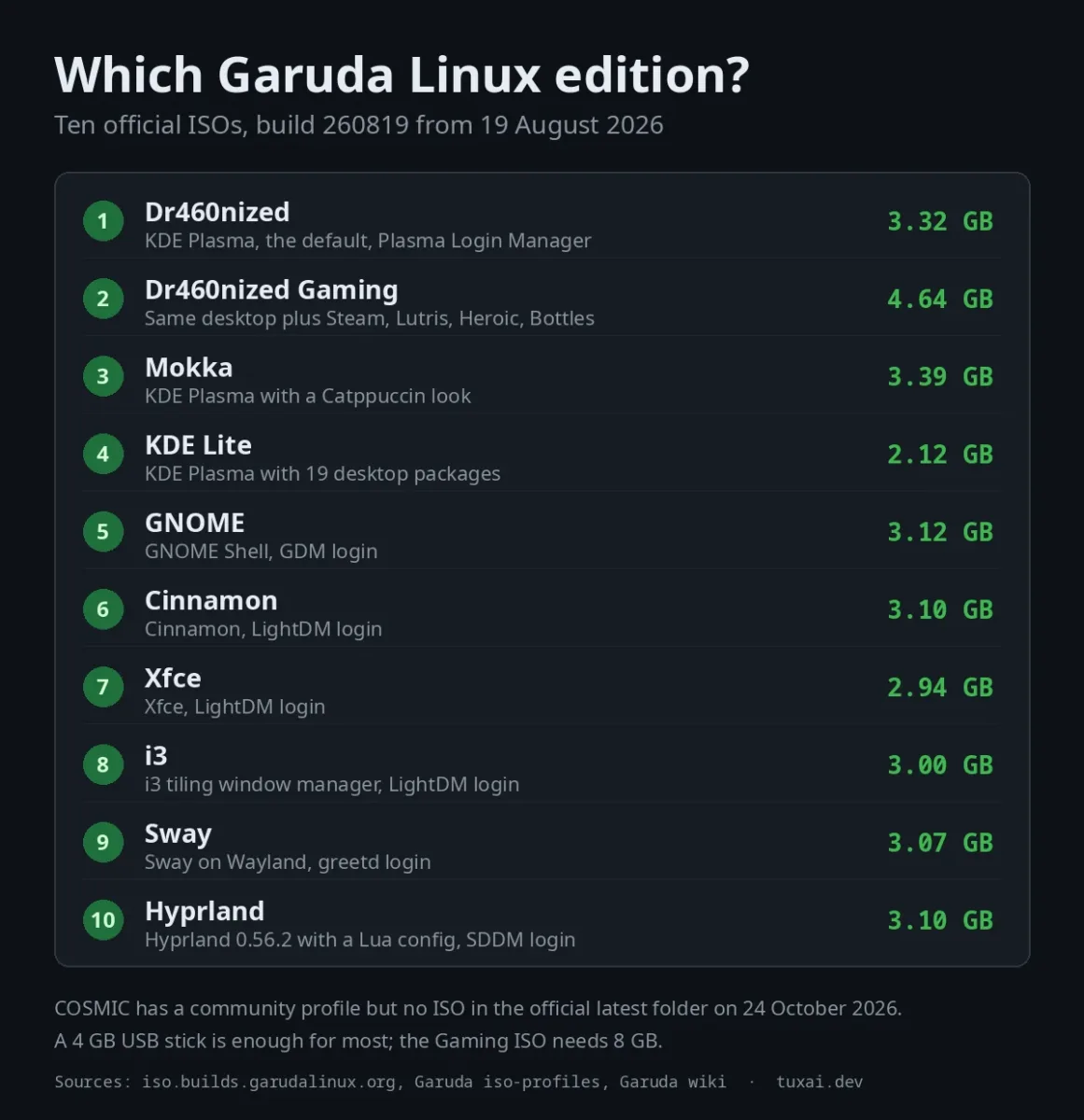
| Edition | Desktop | Login manager | ISO size |
|---|---|---|---|
| Dr460nized | KDE Plasma with the Dr460nized theme | Plasma Login Manager | 3.32 GB |
| Dr460nized Gaming | Same desktop plus game launchers and tuning | Plasma Login Manager | 4.64 GB |
| Mokka | KDE Plasma with a Catppuccin theme | Plasma Login Manager | 3.39 GB |
| KDE Lite | KDE Plasma with 19 desktop packages | Plasma Login Manager | 2.12 GB |
| GNOME | GNOME Shell | GDM | 3.12 GB |
| Cinnamon | Cinnamon | LightDM | 3.10 GB |
| Xfce | Xfce | LightDM | 2.94 GB |
| i3 | i3 tiling window manager | LightDM | 3.00 GB |
| Sway | Sway, Wayland tiling | greetd with nwg-hello | 3.07 GB |
| Hyprland | Hyprland 0.56.2, Wayland tiling | SDDM | 3.10 GB |
Login managers come from each edition's profile.conf in the iso-profiles repository, sizes from the ISO index.
Dr460nized, Mokka and the blur effect
Dr460nized is the default. The wiki's requirements page is written for it, and the Garuda Nix subsystem supports only its desktop. Mokka is the same KDE base with a Catppuccin look. Both install the kwin-effects-forceblur package for window and menu blur. The Garuda wiki quotes that project's own warning that the effect "could be resource-intensive, especially if you have many windows open", and suggests the environment variable KWIN_DRM_NO_AMS=1 on Wayland if the cursor lags under GPU load.
The Dr460nized list has 1,169 packages and the Mokka list has 1,163, so the two are close in size. The difference is mostly the theme.
KDE Lite, GNOME, Cinnamon, Xfce and the tiling editions
KDE Lite is the one to take if you want Plasma and little else. Its desktop package list is 19 lines: plasma-desktop, Dolphin, Konsole, Ark, the network and audio applets and a few support packages. Dr460nized has 53 in the same file. The other desktop editions (GNOME, Cinnamon, Xfce) follow the same pattern with their own login managers. i3, Sway and Hyprland are for people who already want a tiling window manager. The Hyprland edition has its own section below.
COSMIC
The iso-profiles repository has a community/cosmic profile with cosmic-greeter, and the 260819 changelog says the build tools gained a COSMIC target. On 24 October 2026 there is no cosmic folder in the official latest listing, so treat it as a community build for now and check the downloads page before planning around it.
Which one for a first install?
If you are unsure, take Dr460nized. It is the default edition, the one the requirements table is written for and the only desktop the Garuda Nix subsystem supports today. Take Dr460nized Gaming only if you will use the launchers it adds, because it is 1.3 GB larger and needs an 8 GB USB stick.
System Requirements and What to Check First
The system requirements page gives these figures for Dr460nized:
| Item | Minimum | Recommended |
|---|---|---|
| Disk | 30 GB | 40 GB |
| RAM | 4 GB | 8 GB |
| USB stick | 4 GB (8 GB for the Gaming edition) | Same |
The wiki says the numbers look high mainly because Calamares uses a lot of RAM during installation, and that window-manager editions need less than KDE. It also lists limits you should read before you flash anything:
- Virtual machines are unsupported. Garuda says it is optimized for real hardware, that some programs refuse to run in VirtualBox without configuration, and that it will not give support for that case. If you still want to try, our VirtualBox guide covers the general setup.
- Dual boot is unsupported. Windows may overwrite GRUB, and you then have to repair the bootloader yourself. Install Windows first and choose "install alongside" in the partition step. Our dual boot guide explains the Windows side.
- Idle RAM is higher than on other distributions. The wiki attributes it to ZRAM and other performance tweaks.
- NVIDIA and Wayland window managers. The wiki says not to use Wayland (Wayfire and Sway) with an NVIDIA GPU, and to use
nvidia-390xxfor old NVIDIA cards.
How to Download and Install Garuda Linux
1. Download and verify the ISO
Download the edition you chose from garudalinux.org/downloads, or browse the mirror directly. Each dated folder holds the ISO, a .sha256 and a .sha1 file, a torrent, a zsync file for resuming and a .pkgs.txt with every package in the image. Verify the download before you write it to a stick:
cd ~/Downloads
sha256sum -c garuda-dr460nized-linux-garuda-260819.iso.sha256
The command prints OK next to the file name when the hash matches. If the file name you downloaded differs, for example latest.iso, compare the hash by hand.
2. Write it to a USB stick
The wiki names Ventoy, Popsicle and dd. With dd, find the stick with lsblk first, because the command erases whatever you point it at:
lsblk
sudo dd if=garuda-dr460nized-linux-garuda-260819.iso of=/dev/sdX bs=4M status=progress oflag=sync
3. Boot the stick and run the installer
Boot from the USB stick, click the Install button on the live desktop and Calamares opens. On a laptop, connect the charger first. The installer works without an internet connection. It has eight steps:
| Step | What you do |
|---|---|
| Welcome | Pick the language of the system and the installer |
| Location | Set the time zone |
| Keyboard | Set the keyboard layout |
| Partitions | "Erase disk" for a main system, "Install alongside" to resize another system, or manual partitioning if you know what you are doing |
| Users | Create the first administrator account |
| Summary | Read the changes once more |
| Install | Wait for the progress bar |
| Finish | Reboot and remove the stick |
The steps come from the installation instructions. The installer's Btrfs module lists seven subvolumes for the system: @, @root, @srv, @cache, @log, @tmp and @home. It appears in the in-place reinstallation code of Garuda's Calamares package, which renames those subvolumes with a timestamp before installing over them.
4. First boot
The Setup Assistant opens after the first boot. Its first prompt offers a system update, and the wiki recommends accepting it: the update first replaces the garuda-update script with the newest version, so fixes for known problems apply before the package update starts. After that you can run its software wizard to install common applications, with the services they need enabled automatically. The kernel on the ISO is also not the newest one: the ISO carries linux-garuda 7.2.0, while the kernel repository's last commit on 23 October 2026 is version 7.3.0-4.
What Garuda Changes on Your System
These are the defaults that make a Garuda install behave differently from plain Arch. Each row names the file in Garuda's garuda-common-settings or in the ISO profile that sets it.
| Setting | Value | Source file |
|---|---|---|
| Swap | zram device the size of your RAM, zstd compression | zram-generator.conf |
| zswap | Switched off at boot | disable-zswap.conf |
| vm.swappiness | 133 | 99-sysctl-garuda.conf |
| NMI watchdog | Off | 99-sysctl-garuda.conf |
| Unprivileged user namespaces | Allowed | 99-sysctl-garuda.conf |
| Magic SysRq | Enabled | 99-sysctl-garuda.conf |
| CFS bandwidth slice | 3000 µs, a value the file credits to Valve's steamos-customizations | 20-sched.conf |
| pacman options | Color, VerbosePkgLists and ILoveCandy on; the [garuda] repository, multilib and [chaotic-aur] added | pacman.yaml in garuda-config-agent |
| Btrfs maintenance | Defrag, scrub and trim weekly; balance, scrub and trim mount points set to auto | btrfsmaintenance.yaml in garuda-config-agent |
| Services on Dr460nized | avahi-daemon, bluetooth, ModemManager, NetworkManager, systemd-timesyncd, systemd-oomd, power-profiles-daemon | profile.conf |
| Extra on the Gaming edition | ananicy-cpp, irqbalance, preload, libvirtd, xboxdrv, xow, fancontrol, lm_sensors | profile.conf of dr460nized-gaming |
The comment in the sysctl file says swappiness is the kernel's preference for swap space, that it runs from 0 to 200 and that the default is 60. Garuda sets 133, on top of a zram device the size of your RAM. For the background on zram and zswap, see our Linux swap guide.
The performance-tweaks package is Gaming only
The performance-tweaks package (version 2.2.0-1) is in the Dr460nized Gaming list and not in the Dr460nized, Mokka or Hyprland lists. It sets the CPU governor and the energy performance preference to performance, sets the PCIe ASPM policy to performance, uses no I/O scheduler on NVMe drives and BFQ on SATA and MMC drives, and sets ppfeaturemask=0xffffffff for AMD GPUs. The governor and the PCIe power policy are set for speed, not for power saving.
The kernel: linux-garuda
Garuda's default kernel is linux-garuda. The repository README says it "pulls linux-cachyos and ensures it always builds against nvidia-dkms-open, and tags the release afterwards". The recipe in that repository keeps the CachyOS build options: the default scheduler selected is the CachyOS default (EEVDF) and the -O3 compiler flag is on. Check what you run with uname -r.
This does not make Garuda a CachyOS derivative. No CachyOS repository packages such as cachyos-keyring or cachyos-mirrorlist are in the package lists. The CachyOS-origin pieces are the kernel recipe, proton-cachyos-slr and cachyos-ananicy-rules-git on the Gaming edition. If CachyOS's own optimized repositories matter to you, read our CachyOS install guide and compare below.
Updating Garuda: garuda-update, Not a Bare pacman -Syu
Garuda's recommended update command is garuda-update, also available as update. It runs pacman underneath, so your account needs sudo rights but you do not run it as root. The wiki page says the idea is to avoid announcements on forums by building the fix into the update itself. In order, it does this:
- Updates itself, so the newest fixes are in place.
- Refreshes the mirror list with
rate-mirrors. - Updates the Arch Linux and Chaotic-AUR keyrings.
- Applies package hotfixes for conflicts, after the developers approved them.
- Runs a free-space check that accounts for Btrfs snapshots holding on to deleted data.
- Starts the pacman update, answering some known prompts automatically.
- Asks you to confirm with y or n.
- Runs common post-update tasks: the locate database, fish completions and micro plugins.
- Shows a changelog if it had to change configuration files.
- Runs
garuda-health.
garuda-update
garuda-update --aur
The command takes these options, and the same values can go in /etc/garuda/garuda-update/config as environment variables:
| Option | Environment variable | What it does |
|---|---|---|
--skip-mirrorlist | SKIP_MIRRORLIST=1 | Does not refresh the mirror list first |
--aur or -a | UPDATE_AUR=1 | Updates AUR packages through paru or yay afterwards |
--no-check-space | NO_CHECK_SPACE=1 | Skips the Btrfs-aware disk space check |
--noconfirm | PACMAN_NOCONFIRM=1 | Uses Garuda's safer version of pacman's noconfirm |
-- [pacman options] | PACMAN_EXTRA_OPTS | Passes extra options to pacman |
There is also a set of repair commands. They change real system files, so run them only when an update is already broken:
| Command | What it does |
|---|---|
garuda-update remote fix | Resets pacman.conf and refreshes the keyrings |
garuda-update remote keyring | Refreshes the keyrings without touching pacman.conf |
garuda-update remote fullfix | Resets pacman.conf, refreshes keyrings and reinstalls every package |
garuda-update remote reinstall | Reinstalls every package |
garuda-update remote reset-snapper | Deletes all Snapper backup subvolumes and snapshots and recreates the Snapper configs |
garuda-update remote reset-audio | Reinstalls Pipewire support and WirePlumber and resets their services |
Partial upgrades
A partial upgrade happens when the package database is refreshed but the system is not fully updated, and you then install something. According to the wiki, three habits cause it: pacman -Sy package, a pacman -Sy followed by a separate pacman -S package some time later, and a pacman -Syu that does not finish (including when you answer no) followed by an install. Garuda system maintenance can detect the state and shows a red flashing "!" that links to a full update. The fix is a full update with garuda-update.
For the pacman side, our package manager comparison shows the usual commands.
garuda-health and the "Garuda" bootloader
garuda-health checks the system after every update. One warning people hit is about the bootloader. GRUB on disk has to match the GRUB package, so Garuda reinstalls it automatically when the package updates, but only if you boot through the UEFI entry named "Garuda". If you start Garuda from another entry, the check warns you. The wiki gives this fix for UEFI systems:
sudo grub-install --target=x86_64-efi --efi-directory=/boot/efi --bootloader-id=GarudaIf your firmware does not let the system change the boot order, set the "Garuda" entry first in the UEFI setup. The wiki also describes a bypass file for people who use another bootloader on purpose.
Garuda Toolbox, the app that replaced the old tools
Garuda Toolbox is one Electron application that groups the maintenance and settings tools. The post-installation wiki page lists what the maintenance tools do: run a system update, refresh the mirror list, refresh the keyrings after "invalid signature" errors, remove a stuck pacman database lock, remove orphan packages and clear the package cache. Version 6.3.0 was released on 9 September 2026, and its changelog shows sections for system settings, gaming, a network assistant, diagnostics and a task manager, plus user and group management added in 6.2.0. The changelogs also refer to it by an older name, Rani.
Btrfs Assistant is a separate application, now also used by other distributions. Its tabs show filesystem usage, subvolumes, Snapper snapshots, Snapper settings and the Btrfs maintenance timers.
Btrfs Snapshots and How to Roll Back
Garuda uses Btrfs with Snapper and takes a snapshot every time the system is updated. By default the snapshots cover the system and exclude your home folder and the logs. If an update leaves you with a system that does not boot, you boot an older snapshot from GRUB and restore it.
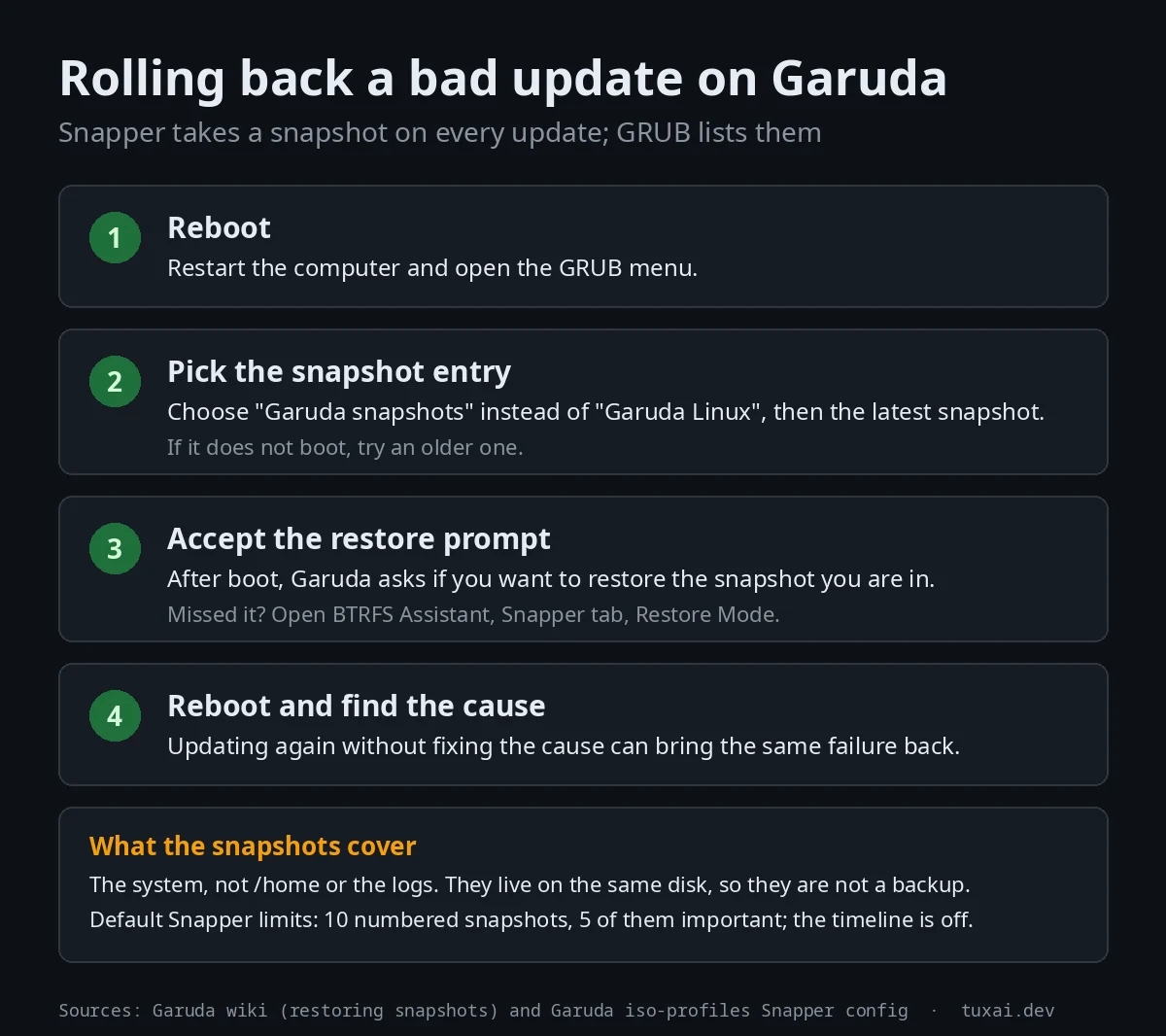
The restoring snapshots page describes the same steps. If you missed the restore prompt, open Btrfs Assistant, go to the Snapper tab and enable Restore Mode. From a live USB you can do the same from the application. Fix the cause before you update again, because the update that broke the system will break it again.
What the Snapper config keeps
| Snapper setting | Value in the ISO profile |
|---|---|
| Numbered snapshots kept | 10 (5 of them marked important) |
| Timeline snapshots | Off by default; if switched on, 5 hourly and 7 daily |
| Minimum age before cleanup | 1,800 seconds |
The values come from etc/snapper/configs/root in the shared overlay of the iso-profiles repository.
pacman refuses to run inside a snapshot
Garuda adds a pacman hook named 01-snapshot-reject.hook. When you are booted into a snapshot, it aborts install, upgrade and remove transactions, except those that involve only garuda-hooks or garuda-update. A service called garuda-pacman-snapshot-reject keeps the hook switched off on a normal boot and switches it on when the system detects that it booted from a snapshot. The effect is that you cannot change a rollback environment by accident before you restore it.
What snapshots do not do
They live on the same disk as the system, so they are not a backup, and the home folder is outside them by default. They also hold on to deleted data, which is why garuda-update has its own free-space check. For files you cannot lose, use a separate backup such as rsync to another disk or server, and encrypt the disk if the machine can be stolen (see our LUKS guide). Our Timeshift guide covers the tool Garuda used before it moved to Snapper.
Chaotic-AUR, the AUR and Flatpak: Where Software Comes From
The pacman configuration agent adds three things to a stock Arch setup: a [garuda] repository, the multilib repository, and [chaotic-aur]. Together with the AUR, that gives four software sources:
| Source | What it holds | Who builds it |
|---|---|---|
| Arch repositories (core, extra, multilib) | The Arch base and most software | Arch Linux |
| [garuda] | Garuda's own packages, built from its PKGBUILDs repository | The Garuda team |
| [chaotic-aur] | Prebuilt AUR packages such as Brave, Google Chrome and Visual Studio Code | Chaotic-AUR's build servers, signed with its key |
| AUR through paru | Build recipes you compile yourself | Your machine, from the recipe |
Chaotic-AUR describes itself as "a semi-automated binary repository for Arch Linux. AUR packages built, signed and mirrored worldwide." Its maintainers marked its eighth anniversary on 18 October 2026. The Garuda wiki's comparison page lists Chaotic-AUR as precompiled software available by default, and says Garuda decided not to support Snap or Flatpak because Chaotic-AUR already has most applications.
Is Chaotic-AUR safe?
No repository is risk-free, and this one asks you to trust a different party than the AUR does. When you install from the AUR yourself, you build from a recipe you can read. With Chaotic-AUR you install a binary that its build servers compiled. The project has changed how it handles that since the wave of AUR malware. According to the announcement relayed on the Garuda forum on 2 November 2025, it keeps a list of trusted maintainers. If every maintainer of a package is trusted, updates go through as before. If at least one is not, a change to anything beyond the version or a hash opens a pull request for human review. On its news page the project says the "times of unsupervised building of packages are gone", and that reviewing updates has turned out to be manageable. The repository is built by the Chaotic Manager infrastructure, version 4.0.
The practical advice is the usual one for any third-party repository: install what you need, keep the list short, and read the review page for packages you are unsure about.
Installing and finding software
# Search and install from the Arch repositories and Chaotic-AUR
pacman -Ss firefox
sudo pacman -S steam

# Build from the AUR when a package is not in Chaotic-AUR
paru -S package-name
Steam needs the multilib repository, which Garuda enables for you. Octopi and Discover give you a graphical store. If you need Flatpak anyway, the wiki points to the Arch wiki and calls Flatpak the source to use when nothing else has the application. Our Snap vs Flatpak vs AppImage guide explains the differences.
Garuda Dr460nized Gaming: What Is Inside
The Gaming edition is the Dr460nized desktop plus a gaming package set. Its package list has 1,582 packages against 1,169 on Dr460nized, and the ISO is 4.64 GB. The groups games, libvirt and kvm are added to the user, and the services listed earlier start on boot. These are the main gaming packages in the 260819 list:
| Role | Packages in the 260819 Gaming ISO |
|---|---|
| Launchers | Steam 1.0.0.87, Lutris 0.5.22, Heroic Games Launcher 2.22.1, Bottles 64.1, Prism Launcher 11.0.3, Minigalaxy 1.4.2 |
| Compatibility | proton-cachyos-slr 11.0.20260703, wine-staging 11.15, Protontricks |
| Performance tools | GameMode 1.8.2, MangoHud 0.8.4, GOverlay, CoreCtrl 1.5.2, ananicy-cpp 1.2.0 with the CachyOS rules |
| Hardware | OpenRGB, Steam devices and game controller udev rules |
| Capture | OBS Studio 32.2.2 |
There is no garuda-gamer package in the list. The wiki's gaming page still mentions the Garuda Gamer app, so the page and the ISO disagree. Use the Toolbox's gaming section or install the launchers with pacman.
The wiki also has a gaming optimizations page that explains how to run the LAVD scheduler from sched_ext, using scx-scheds and scx-tools from Chaotic-AUR. It warns that if you use performance-tweaks, you must remove or comment out energy_performance_preference.conf, or it interferes with the scheduler.
For the general Linux gaming setup, see our Steam and Proton guide. Other distributions built for the same audience: CachyOS, Bazzite and Pika OS, and for a declarative approach NixOS for gaming.
Garuda Hyprland: Config File, Packages and Keybindings
The Hyprland edition (3.10 GB, 1,140 packages) installs Hyprland 0.56.2 with hyprlock, hypridle, UWSM, Waybar, Mako, wofi, kitty, wpaperd and SDDM. Garuda's settings package, garuda-hyprland-settings, supplies the config.
The config is a Lua file
Hyprland's own wiki says that since version 0.55 the old hyprlang syntax is deprecated in favor of Lua, and that the config lives at ~/.config/hypr/hyprland.lua. Garuda ships exactly that file. It starts with monitor and autostart calls such as hl.monitor and hl.exec_cmd. A tutorial that tells you to edit hyprland.conf was written for the old syntax and will not match this install. The Hyprland wiki links its 0.54 pages for that case.
Garuda also adds a set of settings modules under ~/.config/gum_implementation: window gaps, border size and colors, blur, corners, shadows, animations, monitor, status bar, layouts and an eye-protection option. They are Lua files too.
Default keybindings
The Garuda wiki's Hyprland cheatsheet lists these as the defaults. Mod is the Super key (the Windows key, or Command on an Apple keyboard) and can be changed in the config. The page was last edited on 12 August 2026, so check the bind list in hyprland.lua if a key does not respond.
| Action | Keys |
|---|---|
| Open a terminal | Mod + T or Mod + Enter |
| App finder (wofi) | Mod + D |
| Close the active window | Mod + Q |
| Reload the Hyprland config | Mod + Shift + R |
| Fullscreen | Mod + F |
| Maximize | Mod + M |
| Toggle floating mode | Mod + Shift + Space |
| Clipboard history (cliphist) | Mod + V |
| Emoji picker | Mod + E |
| Move or resize a window | Mod + left or right mouse button drag |
| Open FireDragon | Mod + F1 |
| Open Snapper Tools | Mod + F11 |
If you want a different shell on top of Hyprland, see our guides to Caelestia and Noctalia, or our Omarchy review for another opinionated Arch and Hyprland setup.
NVIDIA, Hardware Profiles and Secure Boot
Garuda replaced MHWD with its own Garuda Hardware Tool (ght) in the 260819 release, according to the changelog. The standard ISO carries garuda-hardware-profile-standard. The hardware package list used by the installer includes garuda-hardware-profile-nvidia, marked non-free, a Broadcom wireless driver and a virtual machine profile. The base package list contains no NVIDIA driver, so NVIDIA support is handled by that hardware profile and not by the base list. The wiki's notes on NVIDIA and Wayland window managers are in the requirements section above.
Secure Boot
Garuda supports Secure Boot as an option through the garuda-secureboot package, for UEFI systems only. The wiki says to use it when another operating system or program requires Secure Boot, and to leave it off otherwise. It also warns that the private key is stored on the disk and that Arch kernels do not enforce strict Secure Boot rules, so the protection is limited. Full disk encryption is its suggested defense against a stolen device.
sudo pacman -S garuda-secureboot
sudo garuda-secureboot --install
# Reboot, choose "Enroll MOK", enter the password: garuda
# Then enable Secure Boot in the UEFI setup and check:
sudo garuda-secureboot
The MOK enrollment password is the lowercase word garuda, and the password box shows nothing while you type. Kernels are signed when installed through garuda-dracut-support, and GRUB is signed by garuda-hooks. The keys are in /var/lib/garuda/secureboot/keys/.
Garuda Nix: NixOS Next to Garuda
Garuda also builds Garuda Nix, a Nix flake that can run NixOS beside Garuda on the same Btrfs partition, serve as a module for NixOS, or install from its own ISO. None of the five older reviews compared above mentions it.
The subsystem route starts from a running Garuda install, and the project's docs say it works through Btrfs subvolumes, so only Garuda is supported as the host. Users, passwords and locales are taken from Garuda, and part of /home can be shared. At the time of writing, the Dr460nized desktop is the only option.
sudo pacman -S garuda-nix-subsystem
garuda-nix-subsystem install
# Reboot and pick "Garuda Nix Subsystem" in GRUB
sudo garuda-nix-subsystem update
The standalone ISO is built daily from the latest tagged commit on the builds page. The docs list a Calamares installer for the mokka and dr460nized editions, and a command-line installer, install-garuda-nix, with presets for desktop, laptop, server and handheld. Its partition layouts include ext4 and Btrfs, each with or without LUKS, and impermanence variants that roll the root back or place it on tmpfs. If you are new to Nix, start with our NixOS flakes guide.
Garuda vs CachyOS, EndeavourOS, Manjaro and Arch
Google's People Also Ask box for Garuda Linux asks which is better, Garuda or CachyOS, so that is the comparison most readers want. The CachyOS column comes from our CachyOS guide, which was tested on the CachyOS 260809 ISO.
| Garuda Linux | CachyOS | |
|---|---|---|
| Base | Arch Linux | Arch Linux |
| Installer | Calamares | Calamares-based installer, plus a terminal installer |
| Default filesystem | Btrfs with Snapper snapshots in GRUB | Btrfs with subvolumes |
| Software sources | Arch, [garuda], Chaotic-AUR, AUR through paru | Arch, CachyOS repositories, Chaotic-AUR |
| Kernel | linux-garuda, built from the linux-cachyos recipe | CachyOS kernel lineup built with LTO, AutoFDO and Propeller, with sched_ext support |
| Optimized packages | No optimized repository: the pacman config adds only [garuda] and [chaotic-aur] | x86-64-v3 builds, with fallback to the standard repository on older CPUs |
| Hardware setup | Garuda Hardware Tool and hardware profiles | chwd, a hardware detection tool |
| First-run helper | Setup Assistant and Garuda Toolbox | CachyOS-Hello |
| Update tooling | garuda-update wrapper with hotfixes and a health check | Plain pacman, as on Arch |
The table points to three differences. Garuda sets up rollback for you (Snapper snapshots on every update, listed in GRUB) and wraps updates in a script. CachyOS ships its own optimized repositories and a wider kernel lineup. Both come with the Chaotic-AUR repository enabled and both default to Btrfs. If rollback from the boot menu is the feature you want, Garuda has it ready. If CPU-optimized packages and kernel choice are the draw, look at CachyOS.
For the others: our EndeavourOS guide describes a near-vanilla Arch experience on the Arch repositories without delay, and our Manjaro guide describes its own repositories with a package delay of about two weeks. Garuda's comparison page makes a similar point about Manjaro, though it is Garuda's claim about a competitor. Plain Arch gives you the same packages with no preconfigured tools, which our Arch installation guide walks through.
Garuda-Specific Commands
These commands exist because of Garuda's packages. The descriptions come from the scripts in garuda-common-settings, the wiki pages above and the changelog.
| Command | What it does |
|---|---|
garuda-update or update | Updates the system with Garuda's hotfixes and checks, described in the update section |
garuda-health | Runs the health checker. garuda-update runs it at the end, and it is the source of the bootloader warning |
garuda-inxi | Prints an inxi-based system report. Its script detects dual boot and the snapshot tool, and the changelog says it adds hardware profiles, NVIDIA modules, the Garuda release timestamp and the garuda-health result |
garuda-diag | Collects diagnostics. It first asks for confirmation, then downloads and runs a script from garudalinux.org/os/garuda-diag/diagnostic. The script itself says it will "blindly execute" the download, so read that URL before you answer yes |
garuda-privatebin | Creates a PrivateBin paste that expires after one month and prints the link and a QR code |
dkms-rebuild | A full DKMS reset: deletes the state in /var/lib/dkms, then rebuilds every DKMS module found in /usr/src for every installed kernel. Use it for a broken kernel module, not as routine maintenance |
sudo garuda-secureboot | Installs or reports Secure Boot support, covered above |
garuda-nix-subsystem | Installs and updates the NixOS subsystem, covered above |
sudo snapper -c root list | Lists the Snapper snapshots of the root configuration |
Who Should Skip Garuda Linux
These limits come from warnings in Garuda's wiki and repositories.
| Situation | What Garuda's documentation says |
|---|---|
| You want to run it in a VM | Not recommended and not supported. Some programs refuse to run in VirtualBox without configuration |
| You want to dual boot | Unsupported. Windows may overwrite GRUB and you repair it yourself |
| You have a small or old machine | Idle RAM is higher than on other distributions because of ZRAM and other tweaks; 8 GB RAM is the recommended figure |
| You use an NVIDIA GPU with a Wayland window manager | Do not use Wayfire or Sway with NVIDIA |
You run pacman -Sy by habit | It causes partial upgrades, which are unsupported and can break the system. Use garuda-update |
| You rely on snapshots as backups | Snapshots cover the system and not /home by default. They are Btrfs snapshots on the same filesystem, so a failing disk takes them too |
Troubleshooting Common Questions
What is Garuda Linux good for?
Garuda Linux is good for people who want Arch packages and the AUR with a graphical installer, bootable Btrfs snapshots and a styled desktop already set up. The Gaming edition adds launchers and tuning. It is a poor fit for virtual machines, low-RAM machines and people who want to assemble the system themselves.
Is Garuda Linux good for gaming?
Yes, if you choose the Dr460nized Gaming edition or install the same tools on another edition. The 260819 Gaming ISO ships Steam, Lutris, Heroic, Bottles, proton-cachyos-slr, Wine Staging, GameMode, MangoHud and ananicy-cpp, and its performance-tweaks package sets the CPU governor to performance. This guide has no frame-rate benchmarks, because it was not run on hardware.
Which is better, Garuda Linux or CachyOS?
Neither is better in general. Garuda has Snapper snapshots in GRUB and an update script with hotfixes. CachyOS has its own optimized repositories, a wider kernel lineup and a hardware detection tool. Both are Arch-based, default to Btrfs and have Chaotic-AUR enabled. The comparison table above has the rows.
How do I install Steam on Garuda Linux?
On the Gaming edition Steam is already installed. On the other editions, run sudo pacman -S steam. Steam needs the multilib repository, which Garuda enables by default. Our Steam and Proton guide covers enabling Proton.
Is Garuda Linux Indian?
It depends on what you mean. Wikipedia names two people behind the first release in March 2020: Shrinivas Vishnu Kumbhar, a student from India, and SGS from Germany. The name refers to Garuda, a divine eagle in Hindu mythology.
Is Garuda Linux good for beginners?
It is easier to install than Arch because Calamares does the partitioning and the Setup Assistant runs the first update. It is not as forgiving as a stable-release distribution. It is rolling, and Garuda's own documentation warns that a partial upgrade can break the system. If you want a system that changes less, our Linux Mint guide covers a stable-release option.
What is Garuda Linux based on?
Arch Linux. Garuda uses the Arch repositories and pacman, and adds its own [garuda] repository and Chaotic-AUR. The installer is Calamares and the bootloader is GRUB.
What is the Garuda Linux repository?
[garuda] is the repository with Garuda's own packages, built from its PKGBUILDs repository: settings, tools and themes. It is enabled next to core, extra, multilib and [chaotic-aur] in /etc/pacman.conf, and uses the Chaotic mirror list.
How do I update Garuda Linux?
Run garuda-update in a terminal, or use the system update option in Garuda Toolbox. Avoid pacman -Sy followed by installing a package, because Garuda calls that a partial upgrade and does not support it.
What are the most useful Garuda Linux commands?
The ones Garuda adds are garuda-update for updates, garuda-health for checks after them, garuda-inxi for a system report to share when you ask for help, and dkms-rebuild for a broken kernel module. The table in the commands section lists each one with what it does.
Where do I download Garuda Linux?
From garudalinux.org/downloads or the official ISO index. Each ISO has a .sha256 file next to it. The latest official builds are dated 19 August 2026.
Can I run Garuda Linux in VirtualBox or another virtual machine?
You can try, but Garuda says it is optimized for real hardware and will not support virtual machines. Some programs, such as Picom and Alacritty, refuse to run in VirtualBox without configuration, according to the wiki. The hardware package list does include a VM profile.
pacman says "invalid or corrupted package" or a signature error. What now?
Refresh the keyrings. In Garuda Toolbox, the maintenance section has a keyring refresh. In a terminal, garuda-update remote keyring refreshes them without touching pacman.conf. If that does not work, garuda-update remote fix also resets pacman.conf.
garuda-health says I am not using the Garuda bootloader. Is that a problem?
It can be. GRUB on disk has to stay in step with the GRUB package, and Garuda only updates it automatically when you boot through the "Garuda" UEFI entry. Run sudo grub-install --target=x86_64-efi --efi-directory=/boot/efi --bootloader-id=Garuda or set that entry first in your UEFI setup.
Does Garuda Linux support Secure Boot?
Yes, as an optional feature on UEFI systems. Install garuda-secureboot, run sudo garuda-secureboot --install, enroll the key at the next boot and turn Secure Boot on in the firmware. The wiki says the protection is limited because the key sits on the disk.
What Was Not Tested, and Sources
This guide was written from Garuda's published sources and was not installed on hardware or in a virtual machine for it. That means no screenshots of the installer, no measured boot time, RAM use or battery life, and no check of the NVIDIA, Secure Boot and Garuda Nix procedures on a real machine. Every ISO version number comes from the 260819 package lists, every setting from the named file in Garuda's repositories, and every procedure from the wiki page linked next to it. Behavior that changed after 24 October 2026 will not be reflected here.
Sources read on 24 October 2026. The wiki pages were read from the wiki's own repository, last updated on 12 August 2026.
- Garuda Linux and its official ISO index, including the 260819 package list
- Garuda wiki: system requirements, installation, post-installation tasks, garuda-update, partial upgrades, restoring snapshots, the Garuda bootloader, Secure Boot, Flatpak, gaming, gaming optimizations, comparison, Hyprland cheatsheet
- Garuda on GitLab: iso-profiles, garuda-common-settings, performance-tweaks, garuda-hyprland-settings, linux-garuda, Toolbox, pkgbuilds, changelogs, garuda-nix, chaotic-manager
- Chaotic-AUR and the trusted maintainers announcement
- Hyprland wiki: Start here
- Garuda Linux on Wikipedia
- Older reviews compared above: It's FOSS, Tecmint, Debugpoint, How-To Geek, CyberPanel
- CachyOS installation requirements
On this site: CachyOS, Bazzite, Pika OS, Arch Linux installation, Linux package managers, NixOS flakes guide, Caelestia Shell, Linux gaming with Steam and Proton.

JM Carreira
I’ve used Linux since 2008 and it has been my main system since 2021. When an article has a “Tested on” box, I ran the steps on my Lenovo Tiny. More about me and the test machine.