
Hannah Montana Linux: Every Version and How to Try It (2026)

Part of our Debian guide
Hannah Montana Linux is a real Linux distribution with a desktop themed on the Disney Channel series Hannah Montana. It exists in two generations. The original, released in 2009, is Kubuntu 9.04 with KDE 4.2 and pink and purple artwork, and nobody has updated it since. The current one, Hannah Montana Linux v26, is a 2026 remaster by developer Noah Cagle built on Debian 13 with KDE Plasma 6, and it now has a lighter LXQt edition and an unofficial port for Apple Silicon Macs.
Some people search for it as "Hannah Montana OS" or "the Hannah Montana operating system". It is the same project. This guide covers every version that exists as of 7 October 2026: what each one is built on, what it installs, what hardware it needs, where the official downloads are, and how to try it without touching the system you use every day. Every version number, date and file size below comes from the project's own repositories and download pages, linked in each section.
- Hannah Montana Linux at a glance
- What is Hannah Montana Linux?
- From 2009 to 2026: a short history
- The original Hannah Montana Linux (2009)
- Hannah Montana Linux v26: the 2026 remaster
- HML26 Lite: the version for older PCs
- Hannah Montana Linux on a Mac: the ARM64 port
- Hannah Montana ALE: the Arch Linux experiment
- Hannah Montana Linux system requirements
- How to try Hannah Montana Linux safely
- Get the Hannah Montana look on any KDE Plasma desktop
- How to build Hannah Montana Linux from source
- Is Hannah Montana Linux worth installing?
- Troubleshooting Hannah Montana Linux: Common Problems and Questions
- Is Hannah Montana Linux a real operating system?
- Is Hannah Montana Linux still maintained?
- Why does Hannah Montana Linux exist?
- Is Hannah Montana Linux safe to use?
- Can I upgrade the 2009 original to v26?
- The 2009 ISO will not boot on my PC. What can I do?
- Websites will not load in the 2009 version.
- The v26 installer fails at the bootloader step without internet.
- I built HML26 Lite from source and got KDE Plasma.
- Why does my system say version 26.0 after installing 26.1.1?
- Does Hannah Montana Linux run on a Mac?
- How much RAM does Hannah Montana Linux need?
- Is Hannah Montana Linux made by Disney?
- Can you play games on Hannah Montana Linux?
- Sources
Hannah Montana Linux at a glance
| Edition | Based on | Desktop | Latest release | ISO size | Status |
|---|---|---|---|---|---|
| Original (2009) | Kubuntu 9.04 | KDE 4.2 | "V2" ISO, 2009 | 725 MB | Abandoned, no security updates since 2010 |
| v26 (main) | Debian 13.5 "trixie" | KDE Plasma 6 | 26.1.1, 4 August 2026 | 2.6 GB | Active, by Noah Cagle |
| v26 Lite | Debian 13 "trixie" | LXQt 2.1 | 26.1.1 Lite, 4 August 2026 | 2.0 GB | Active, by Noah Cagle |
| v26 ARM64 (unofficial) | Debian 13, arm64 | KDE Plasma 6 | 26.0, 5 July 2026 | 2.7 GB | Community port for Apple Silicon |
| ALE (Arch Linux Edition) | Arch Linux | KDE 4.2.2 | 0.1b, 5 February 2023 | 1.8 GB | Experiment, no changes since 2023 |
If you only want to see it running, the short answer is: download v26.1.1 from the official GitLab releases page and boot it in a virtual machine. If your computer has 4 GB of RAM or less, take the Lite edition instead. Leave the 2009 original for an offline virtual machine, as a museum piece.
What is Hannah Montana Linux?
Hannah Montana Linux (HML) is a Kubuntu-based operating system with a complete Hannah Montana theme. The original project page describes it as "a free operating system based on Kubuntu with a Hannah Montana theme" and lists what the theme covers: the boot screen, the KDM login manager, the icon set, the KDE splash screen, the Plasma theme, the color scheme and the wallpapers. The same page promises that it is "fast, stable and powerful" and that "it is not vulnerable to Windows viruses".
Underneath the artwork it was an ordinary Kubuntu system: the same packages, the same KDE desktop and the same apt package manager. That is a large part of its appeal: it was a fully working Linux distribution of its time, dressed in the colors of a show aimed at children and teenagers.
Nobody knows who made it. The SourceForge project lists two maintainers with the usernames mileycyrus and slashuer, and nothing more. When the remaster made the news in July 2026, both Tom's Hardware and PC Gamer noted that little is known about the original authors or why they stopped. In the years after 2009 it became a running joke in Linux communities, which is why a modern version got so much attention.
None of these projects is an official Disney product. The ARM64 port says so explicitly in its README: it is "not affiliated with or endorsed by Noah Cagle or Disney".
From 2009 to 2026: a short history
Hannah Montana Linux had one release in 2009, a fan revival on Arch Linux in 2022 and 2023, and a full remaster in 2026. The timeline below uses the dates published on SourceForge, GitLab, GitHub, the Internet Archive and YouTube.
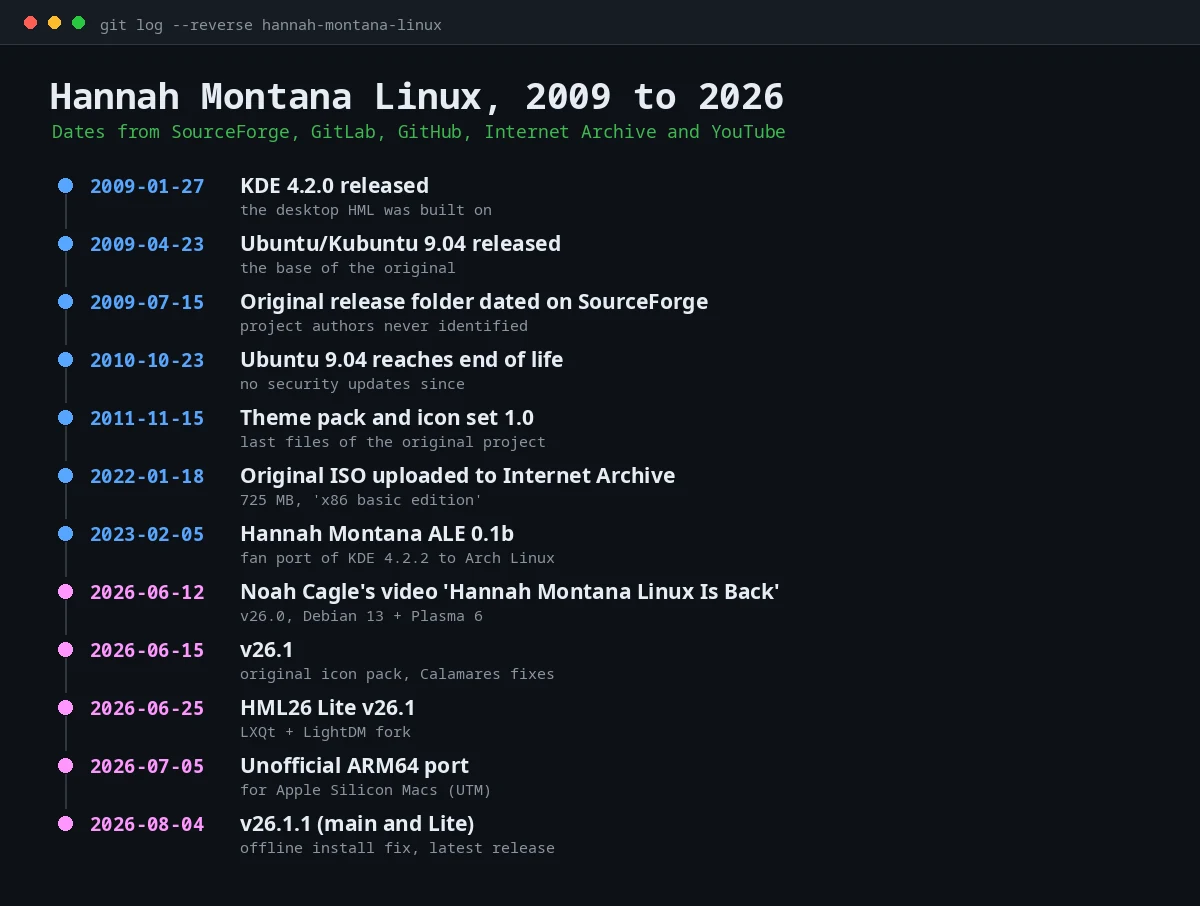
- 2009: the original is built on Kubuntu 9.04 (released 23 April 2009) with KDE 4.2 (released 27 January 2009). The release folder on SourceForge is dated 15 July 2009.
- 2010: Ubuntu 9.04 reaches end of life on 23 October 2010. From that day the base system stops getting security fixes.
- 2011: a theme pack (52.4 MB) and an icon set (32.7 MB) appear on SourceForge, dated 15 November 2011. They are the last files the original project published.
- 2022: a copy of the ISO is uploaded to the Internet Archive on 18 January 2022. In March, a developer starts Hannah Montana ALE, a port of the 2009 desktop to Arch Linux.
- 2026: Noah Cagle publishes the video "Hannah Montana Linux Is Back" on 12 June 2026 and releases v26. Versions 26.1 (15 June) and 26.1.1 (4 August) follow, along with the Lite edition (25 June) and an unofficial ARM64 port (5 July).
The original Hannah Montana Linux (2009)
The 2009 Hannah Montana Linux is a live CD of Kubuntu 9.04 with KDE 4.2 and the full Hannah Montana theme. You could boot it to try the desktop and then install it from the same disc. Its download page offered a "Hannah Montana Linux V2 ISO" through Tucows, plus the logo, the theme pack and the icon set.
Why the 2009 version does not work today
The 2009 release cannot do normal things on a modern computer or a modern internet. Its base, Ubuntu 9.04, lost support on 23 October 2010, so its repositories, its web browser and its encryption libraries are frozen at that point.
XDA Developers spent a day trying to run it in 2025 and documented what happens:
- The Tucows download link on the official page no longer works. The writer had to get the ISO from the Internet Archive.
- It refused to boot on real hardware. The writer tried a Ryzen 5 1600 desktop, a NAS and a single-board computer, with USB drives and with network boot, in UEFI and in legacy mode.
- In a Proxmox virtual machine it crashed with a kernel panic seconds after starting.
- In VirtualBox it booted and installed in under a minute.
- Once running, the Konqueror browser failed on every website with an "SSL negotiation failed" error, package installation pointed to broken links, and the built-in updater could not download anything.
That matches what you would expect from any 2009 distribution. Websites today require encryption that a 2009 browser does not support, and the Ubuntu mirrors for 9.04 have long been moved or removed. Noah Cagle described the original as "basically unusable" because it is insecure and has poor software support, as quoted in Tom's Hardware's coverage of the remaster.
Where to find the original ISO
The copy most people use today is the Internet Archive item "Hannah Montana Linux x86 basic edition", uploaded on 18 January 2022. According to the item's metadata, the file is hannah_montana_linux_x86_basic_edition.iso, 725,141,504 bytes, with this MD5 checksum:
a89f34b142a710c20e331cbc36c02e57 hannah_montana_linux_x86_basic_edition.isoCheck it with md5sum hannah_montana_linux_x86_basic_edition.iso. A matching checksum only proves you have the same file the Internet Archive stores. It does not prove the upload is identical to the 2009 release, because the original project never published checksums. Run it only in a virtual machine with networking turned off.
Hannah Montana Linux v26: the 2026 remaster
Hannah Montana Linux v26 is a new distribution that recreates the 2009 look on top of a current Debian system. It is not an update to the original. Noah Cagle built it as the subject of a YouTube video, and the project's README is frank about what it is: "Much of this project is just a re-skin of KDE Plasma." Many of its components are modified copies of Breeze, Plasma's default theme, so the project is licensed under the GPLv3 or later.
The launch video went up on 12 June 2026 and had 88,562 views on 7 October 2026. Tom's Hardware covered the release on 5 July and PC Gamer on 11 July, quoting Cagle: "If you want to, you can use Hannah Montana Linux as your main day-to-day operating system."

What is under the hood
The build configuration in the repository answers this exactly. The auto/config script builds a Debian 13 "trixie" image for 64-bit PCs (amd64) as a hybrid ISO, enables the main contrib non-free non-free-firmware archive areas and installs recommended packages. The package lists add the KDE desktop, the login screen, the installer and a set of firmware packages so Wi-Fi and graphics work on common hardware.
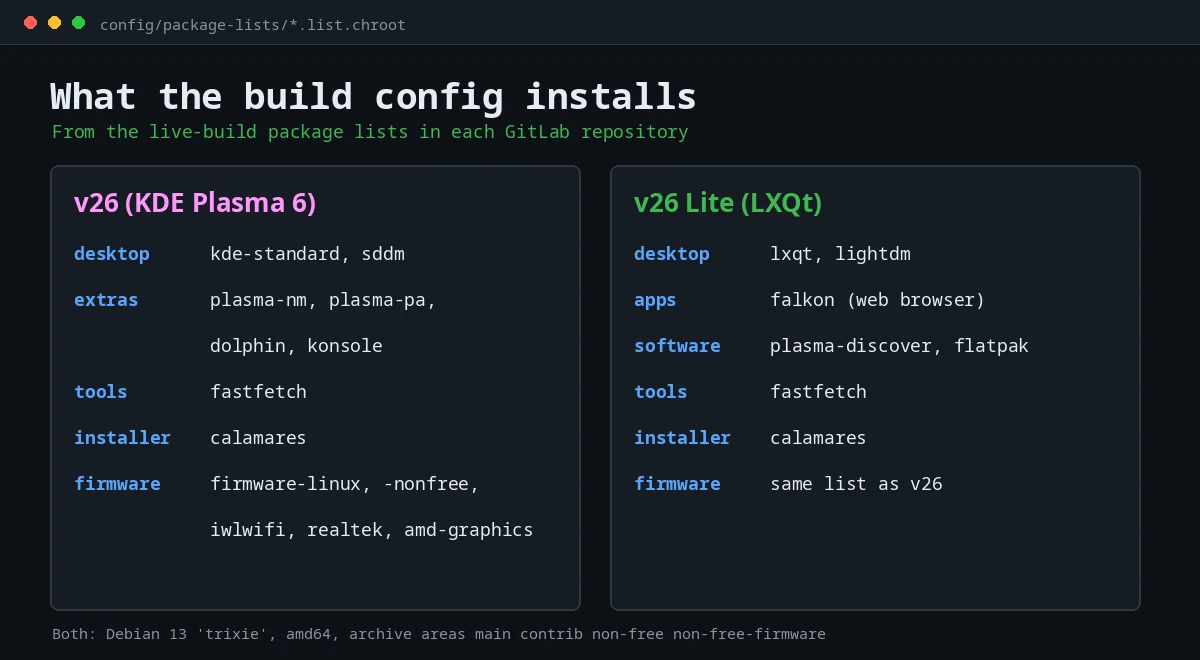
Because it uses Debian's own packages, the versions are Debian 13's versions. In Debian 13 that means Plasma 6.3, the Linux 6.12 kernel series and Calamares 3.3.14. The system identifies itself in /etc/os-release as:
PRETTY_NAME="Hannah Montana Linux 26"
NAME="Hannah Montana Linux"
VERSION_ID="26.0"
DEBIAN_VERSION_FULL=13.5
ID=hml
ID_LIKE=debian
The ID_LIKE=debian line is the useful one in practice. Any tutorial or package written for Debian 13 applies to Hannah Montana Linux v26 as well, including our Debian 13 installation guide.
What makes it look like Hannah Montana
The theme is spread across every screen you see from power-on to the terminal. Going through the repository and the project's own descriptions, these are the pieces:
- Desktop: a Plasma style and global theme built by modifying Breeze, plus a color scheme called
PrettyPink. - Icons: the icon pack from the original 2009 release, added in version 26.1 "by popular demand", according to the commit history.
- Wallpaper: the original 4:3 PNG, remastered by Cagle to 16:9, as Tom's Hardware and PC Gamer describe it.
- Start button: a stylized "H".
- Boot and login: a themed GRUB background, a boot splash and an SDDM login theme called
hannah-montana-sddm. - Installer: Calamares with its own branding and a pink sidebar (
#FF96FF). - Terminal: a pink Bash prompt and fastfetch with a Hannah Montana Linux ASCII logo, set up in the default user profile.
- System information: the KDE "About this System" page carries the Hannah Montana Linux branding.
Version history
- 26.0 (June 2026): the release shown in the launch video.
- 26.1 (15 June 2026): adds the icon pack from the original Hannah Montana Linux and fixes problems in the Calamares installer.
- 26.1.1 (4 August 2026): adds the GRUB packages to the live system so the installer works offline, without downloading anything.
Version 26.1.1 is the current release for both the main and the Lite editions. New versions appear on the same GitLab releases page linked at the top of this guide.
HML26 Lite: the version for older PCs
HML26 Lite is a fork of v26 that replaces KDE Plasma with LXQt and the SDDM login screen with LightDM. The main README is direct about why it exists: "Generally, you need about 8GB of RAM to run Plasma 6 comfortably", while "LXQt can run comfortably with only 2GB of RAM, while offering a fully capable desktop experience."
Its package lists add three things the main edition does not list explicitly: the Falkon web browser, the Discover software center and Flatpak. That gives Lite a graphical software center, and Flatpak support for Flathub apps once you add the Flathub repository. If Flatpak is new to you, our comparison of Snap, Flatpak and AppImage explains how it differs from regular Debian packages.
The first Lite release was v26.1 Lite on 25 June 2026. The current one is v26.1.1 Lite, released on 4 August 2026 alongside the main edition. Its ISO is 2.0 GB, about 600 MB smaller than the Plasma version. Downloads are on the Lite releases page.
Hannah Montana Linux on a Mac: the ARM64 port
There is no official build for Apple Silicon. A community developer published an unofficial ARM64 port of v26.0 on 5 July 2026, on GitHub and SourceForge. Its README lists it as "Tested in UTM on Apple Silicon Macs", which is the virtualization app most Mac users already use for Linux.
Three things to know before you download it:
- It is based on v26.0, so it does not include the changes from 26.1 and 26.1.1.
- The ISO,
live-image-arm64.hybrid.iso, is 2.7 GB and comes with aSHA256SUMS.txtfile. It is the only Hannah Montana Linux release whose author publishes a checksum file. - It is "an unofficial community adaptation" and is "not affiliated with or endorsed by Noah Cagle or Disney", in its own words.
Hannah Montana ALE: the Arch Linux experiment
Hannah Montana ALE ("Arch Linux Edition") is a fan project that tried to run the original 2009 desktop, KDE 4.2.2, on a modern Arch Linux system. Its GitHub repository was created in March 2022 and its only release, 0.1b, came out on 5 February 2023 as a 1.8 GB ISO. The release notes say it "should be fully functional, although it has yet to be tested outside of a virtual machine".
The method is the interesting part. The author imported the apt database from Ubuntu 9.04 into a modern copy of apt, downloaded every package needed for kubuntu-desktop, and converted those .deb files into Arch PKGBUILDs with the debtap tool. The project's own to-do list still includes "fix conflicts between old kde 4.2.2 packages and modern kde libraries". Read it as a curiosity. If you want Arch itself, our Arch Linux installation guide is the place to start.
Hannah Montana Linux system requirements
Hannah Montana Linux v26 needs a 64-bit PC with at least 15 GB of free disk space to install, and about 8 GB of RAM to run comfortably. The Lite edition runs well with 2 GB of RAM.
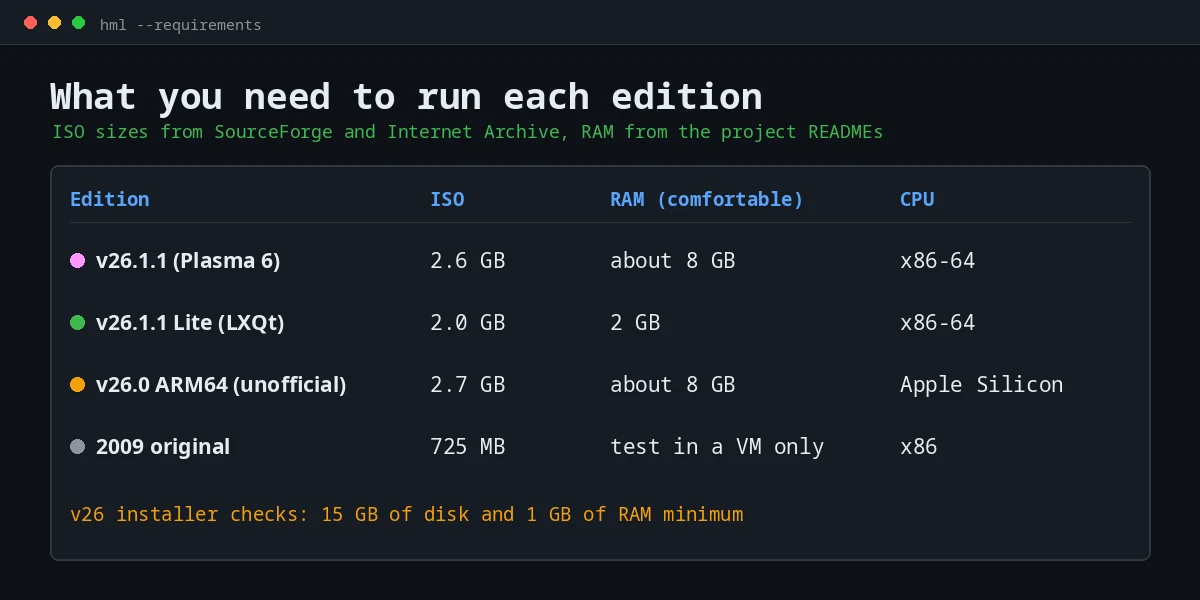
There are two different numbers for v26 because they come from two places. The installer's own configuration (welcome.conf) blocks the installation if the machine has less than 15 GB of storage or less than 1 GB of RAM. That is the hard minimum. The README's 8 GB figure is what Plasma 6 needs to feel smooth.
| Edition | Installer minimum | Comfortable RAM | Virtual machine we would give it |
|---|---|---|---|
| v26 (Plasma 6) | 15 GB disk, 1 GB RAM | About 8 GB | 4 to 8 GB RAM, 2 or more CPU cores, 25 GB disk |
| v26 Lite (LXQt) | Same installer and checks | 2 GB | 2 GB RAM, 2 CPU cores, 20 GB disk |
| ARM64 port | Not documented | About 8 GB | UTM on an Apple Silicon Mac, 4 to 8 GB RAM |
| 2009 original | Not documented | Not documented | VirtualBox, networking off |
The last column is our recommendation, not the project's. The 25 GB disk leaves room above the installer's 15 GB check for updates and a few applications.
How to try Hannah Montana Linux safely
The safe way to try Hannah Montana Linux is to boot the ISO in a virtual machine first. Nothing on your computer changes, and you can delete the virtual machine when you are done.
- Choose the edition. v26.1.1 if your computer has 8 GB of RAM or more, v26.1.1 Lite if it has less, the ARM64 port if you are on an Apple Silicon Mac.
- Download it from the official page. Open the v26 releases page or the HML26 Lite downloads on GitLab. The ISO itself is hosted on SourceForge, linked from each release. Avoid copies on other sites.
- Check the file. The x86 releases do not publish a checksum in their release notes, so at least compare the size: about 2.6 GB for v26.1.1 and 2.0 GB for Lite. For the ARM64 port, run
sha256sum -c SHA256SUMS.txtin the download folder. - Create a virtual machine. Use VirtualBox, virt-manager or GNOME Boxes on Linux and Windows, or UTM on a Mac. Our guide to installing Linux in VirtualBox walks through the settings step by step. Use the resources from the table above.
- Boot the live session. Attach the ISO and start the machine. On a BIOS boot, the menu shows "Try Hannah Montana Linux (amd64)" and a fail-safe mode for troublesome graphics. The live desktop runs from memory and writes nothing to the virtual disk.
- Install it if you want to keep it. Launch the installer from the desktop. Calamares asks for your location, keyboard, partitions and user, shows a summary and installs. It does not set a root password. Your user gets administrator rights through
sudo.
To install on a spare computer instead, write the ISO to a USB drive. The image is a hybrid ISO, so balenaEtcher or dd work without extra steps:
sudo dd if=hannah-montana-linux-26-1-1.iso of=/dev/sdX bs=4M status=progress oflag=syncReplace /dev/sdX with your USB drive and check it twice with lsblk first. dd erases the target device without asking.
Get the Hannah Montana look on any KDE Plasma desktop
You do not need to install the distribution to get its look. Noah Cagle published the theme on its own in the hannah-montana-kde-theme repository. Its README describes it as the theme used in the distribution, "as a separate package". It contains five parts: a color scheme (PrettyPink.colors), an icon set (HannahMontana), a global theme (com.decacagle.hml), a Plasma style and a wallpaper.
On a Plasma 6 desktop, these commands copy each part to the standard per-user folders:
git clone https://gitlab.com/DecaCagle/hannah-montana-kde-theme.git
cd hannah-montana-kde-theme
mkdir -p ~/.local/share/{color-schemes,icons,wallpapers,plasma/look-and-feel,plasma/desktoptheme}
cp color-scheme/PrettyPink.colors ~/.local/share/color-schemes/
cp -r icons/HannahMontana ~/.local/share/icons/
cp -r look-and-feel/com.decacagle.hml ~/.local/share/plasma/look-and-feel/
cp -r plasma-style/hannah-montana-theme ~/.local/share/plasma/desktoptheme/
cp -r wallpaper/HannahMontanaTheme ~/.local/share/wallpapers/
Then open System Settings, go to Colors & Themes and pick the pieces you want. The repository does not include installation instructions, so these are the standard Plasma 6 locations and we have not tested this exact theme on our own machine. If a piece does not appear in System Settings, you can still select the color scheme, icons or wallpaper file directly. On Ubuntu, our guide to installing KDE Plasma gets you the desktop first.
How to build Hannah Montana Linux from source
You can build the ISO yourself from the GitLab repository. You need a Debian-based system, because the build tool, live-build, only works there. The README says it does not work on other distributions, "not even inside of a Docker container".
sudo apt install live-build
git clone https://gitlab.com/DecaCagle/hannahmontanalinux26.git
cd hannahmontanalinux26
lb config
sudo lb build
lb config runs the auto/config script automatically. If it fails, check that the script is executable. The README says the build takes about 10 minutes on the author's machine and uses a lot of memory, so close other applications first. The result is a file called live-image-amd64.hybrid.iso in the repository folder.
To build the Lite edition, clone https://gitlab.com/DecaCagle/HannahMontanaLinux26Lite.git instead. Watch out here: the Lite README copies the clone command from the main project, so following it to the letter builds the Plasma version.
Is Hannah Montana Linux worth installing?
It depends on which version and what you want from it.
- For fun or nostalgia: v26 in a virtual machine is the best way to see it. It boots like any modern distribution and the theme is complete.
- As your main system: technically it is Debian 13 with KDE Plasma, so it can work, as Cagle says. Its packages come from Debian's own servers, which the build config points to, so system updates arrive as they do on Debian. The theme, the installer setup and future releases depend on one person, and the last release was on 4 August 2026. If you want the same base with more people behind it, install Debian 13 and add the theme from the previous section.
- On an old laptop: Lite is the one to try. LXQt on Debian 13 is a reasonable combination for 2 GB machines, theme or not.
- The 2009 original: only as a museum piece, in a virtual machine with no network. Do not log into anything from it.
For another KDE-based project that is still taking shape, see our look at KDE Linux, the operating system the KDE project is building itself.
Troubleshooting Hannah Montana Linux: Common Problems and Questions
Is Hannah Montana Linux a real operating system?
Yes. Both generations are complete Linux distributions that boot, install and run applications. The 2009 version is Kubuntu 9.04 with KDE 4.2, and v26 is Debian 13 with KDE Plasma 6. The Hannah Montana part is the theme.
Is Hannah Montana Linux still maintained?
The 2009 original is not. Its last files date from 2011 and its base lost support in 2010. The v26 remaster is maintained by Noah Cagle. Its latest release is 26.1.1, from 4 August 2026, for both the main and the Lite editions.
Why does Hannah Montana Linux exist?
The original authors never explained it, and they never identified themselves. Their site only describes it as Kubuntu with a Hannah Montana theme. The 2026 remaster exists because Noah Cagle decided to rebuild it for a YouTube video, using the original artwork on a modern Debian base.
Is Hannah Montana Linux safe to use?
Version 26 is as safe as the Debian 13 packages it is built from, plus a theme whose full source is public on GitLab. The ISOs are built by one person and published without checksums, so download them only from the official release pages. The 2009 version is not safe online: it has had no security fixes since 2010.
Can I upgrade the 2009 original to v26?
No. v26 is a different distribution on a different base, Debian instead of Ubuntu. There is no upgrade path. You install v26 from its own ISO.
The 2009 ISO will not boot on my PC. What can I do?
Use a virtual machine. In XDA's 2025 test, the original failed on three different physical machines and crashed in Proxmox, but booted in VirtualBox. Modern hardware and firmware are simply too new for a 2009 kernel.
Websites will not load in the 2009 version.
That is expected. Its browser fails with "SSL negotiation failed" because current websites require encryption it does not support, and its update servers no longer exist. There is no fix inside the 2009 system. Use v26 if you want to browse.
The v26 installer fails at the bootloader step without internet.
You are probably using 26.0 or 26.1. Version 26.1.1 added the GRUB packages to the live system precisely so that Calamares can install without downloading anything. Download 26.1.1, or connect the machine to the internet before installing.
I built HML26 Lite from source and got KDE Plasma.
The Lite README tells you to clone the main repository. Clone https://gitlab.com/DecaCagle/HannahMontanaLinux26Lite.git instead and run the same lb config and sudo lb build steps.
Why does my system say version 26.0 after installing 26.1.1?
The version files were not changed between releases. The /etc/os-release file in the repository still says VERSION_ID="26.0", and the installer branding still says 26.0, so a 26.1 or 26.1.1 install will most likely report 26.0 as well. Check the ISO file name if you need to know which build you used.
Does Hannah Montana Linux run on a Mac?
On Apple Silicon Macs, use the unofficial ARM64 port in UTM. It is based on v26.0. On Intel Macs, the regular amd64 ISO is the one to use in a virtual machine.
How much RAM does Hannah Montana Linux need?
The installer requires at least 1 GB, but the project recommends about 8 GB for the main Plasma edition. The Lite edition runs comfortably with 2 GB.
Is Hannah Montana Linux made by Disney?
No. All versions are fan projects. The original authors are anonymous, v26 is Noah Cagle's personal project, and the ARM64 port states that it is not endorsed by Disney.
Can you play games on Hannah Montana Linux?
As much as on Debian 13, because that is what it runs underneath. Nothing in the build adds gaming tools, so you would install Steam and its dependencies as you would on Debian. If gaming is the main goal, a distribution built for it, such as Bazzite, saves you the setup.
Sources
- Hannah Montana Linux v26 repository, README, build configuration and releases (GitLab, Noah Cagle)
- HML26 Lite repository and releases (GitLab, Noah Cagle)
- Hannah Montana KDE theme repository (GitLab, Noah Cagle)
- Original Hannah Montana Linux website and SourceForge files
- Hannah Montana Linux x86 basic edition (Internet Archive)
- Hannah Montana Linux v26 ARM64 port (SourceForge)
- Hannah Montana ALE (GitHub)
- "Hannah Montana Linux Is Back" (YouTube, Noah Cagle, 12 June 2026)
- I tried Hannah Montana Linux in 2025 (XDA Developers, 4 May 2025)
- Ubuntu release and end-of-life dates and the KDE 4.2 release announcement

JM Carreira
I’ve used Linux since 2008 and it has been my main system since 2021. When an article has a “Tested on” box, I ran the steps on my Lenovo Tiny. More about me and the test machine.