
KDE Linux: Status, Requirements and How to Try the Testing Edition

KDE Linux is an operating system that the KDE project is building itself. Its goal is to package KDE's desktop, Plasma, and its applications as one complete operating system. The project says plainly that it is not finished. As of 4 October 2026, only a Testing edition exists, and the team says it is not yet ready for ordinary users. This guide covers what works today, what the hardware needs, which problems are already known, and how to try the live image without touching your installed system.
- KDE Linux at a glance
- What KDE Linux is
- Where it stands
- How it is built: image-based, not packages
- The base system is under review
- Requirements
- Before you try it
- How to try the live image
- Installing in a virtual machine
- Who to ask and where to report
- Troubleshooting KDE Linux: Common Problems and Questions
- Is KDE Linux stable enough for daily use?
- Does KDE Linux work with NVIDIA graphics cards?
- Why does my USB drive not boot?
- Can I dual boot KDE Linux with Windows?
- Does KDE Linux work in a virtual machine?
- Will KDE Linux support Secure Boot?
- Is KDE Linux the same as KDE Plasma on Ubuntu or Kubuntu?
- Will the base system change?
- Will my printer or Wi-Fi work?
- Further reading
- External sources
KDE Linux at a glance
| KDE Linux | Kubuntu | KDE neon | |
|---|---|---|---|
| Who builds it | The KDE project | Kubuntu team, on an Ubuntu base | KDE community |
| How the base is delivered | One read-only image ("image-based") | Ubuntu packages | Packages |
| Current stage | Testing edition only | Ubuntu 26.04 LTS release | Continuous KDE builds |
| Software source | Built from KDE's git master for the Testing edition | Ubuntu base with KDE Plasma | Packages KDE software "the moment it's released" |
| Who it is for today | Adventurous users with backups ("not yet for regular people") | Ready to use right away | Adventurous KDE enthusiasts |
| Official page | linux.kde.org | kubuntu.org | neon.kde.org |
The Kubuntu and KDE neon descriptions come from their own sites. The KDE Linux description comes from the project's README and its installation page. For a stable KDE desktop on a system you already run, our guide to KDE Plasma on Ubuntu is the practical route.
What KDE Linux is
According to the history and architecture page, the idea started in early 2023 during a Plasma sprint in Augsburg, Germany. KDE developer Harald Sitter built a prototype and showed it publicly at Akademy 2024. The project's stated goals are to be "the KDE operating system", so KDE can work directly with hardware vendors and users, to make users stop installing drivers and optional KDE features by hand, and to be reliable and easy to recover.
The README calls it a KDE-owned, general-purpose Linux-based operating system, and gives the project its codename, "Project Banana". Its current state, in the project's own words: general daily use "should be usable for adventurous people with backups, but not yet for regular people."
Where it stands
The roadmap lists three milestones:
- Testing edition: completed on 6 September 2025.
- Enthusiast and Stable editions: in progress.
- OEM and large-organisation readiness: not started.
Two lifecycle promises are already written down. Every released version can update to the latest one for the whole life of the project, either directly or through an intermediate version. Each release is supported until the next one comes out, so users are expected to update regularly.
Two warnings from the README matter for anyone who tries it. The quality assurance infrastructure "needs more thoroughness", so the project expects some bad builds that you will have to roll back. And anything preinstalled may be removed before the beta release, so do not build a workflow on any of it yet.
How it is built: image-based, not packages
KDE Linux is an image-based system. According to the architecture page, the whole base system ships as one unit, not as thousands of packages that get assembled on your computer. The project also says the word "immutable" can mislead. The base is a read-only image, but everything else on the system can be changed, and the base can be extended through systemd extensions. The bootloader is systemd-boot.
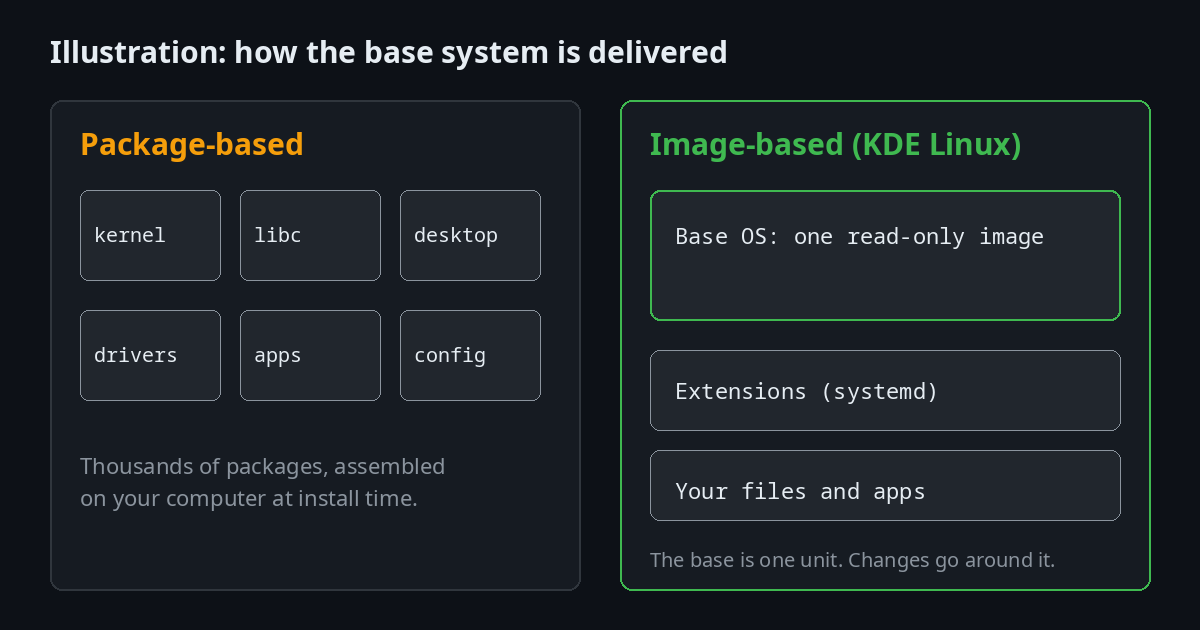
Illustration of the two models, not a screenshot of KDE Linux.
Because the base is a single unit, a change to it means a new image, not a set of separate package updates. That also lets the project test a complete system before it reaches you.
The base system is under review
Today KDE Linux takes its base from Arch Linux packages. The KDE developers are testing a version built with BuildStream instead. According to Phoronix, 2 October 2026, the project is close to deciding whether to adopt it. Phoronix quotes the September progress report by Nate Graham, which gives the reasons:
- Arch is a rolling-release system, and KDE Linux does not plan to be one. The user and stable editions will have time-based releases. Staying on Arch means accepting whatever Arch ships at the moment KDE branches for a release, or maintaining a fork.
- With BuildStream, KDE would control the software versions it builds, and could add packages that Arch does not carry.
- The BuildStream variant is based on the FreeDesktop Flatpak SDK, the same base used by GNOME OS, so maintenance would be shared among three projects.
- If the change goes ahead, the project says the result should behave the same and users should not notice.
The developers said they plan to work toward a decision in October, without committing to a date. Until they decide, Arch packages are what you get.
Requirements
The installation page lists these requirements:
| Requirement | What KDE Linux needs |
|---|---|
| Firmware | UEFI. BIOS is not supported. Most computers sold in the last 15 years have UEFI |
| CPU | AMD or Intel. ARM chips, including Apple M-series and Qualcomm Snapdragon, are not supported yet |
| Memory | 2 GB |
| Storage | 15 GB |
| Disk | A whole disk. Complex partition layouts are not supported yet |
| Other operating systems | None on the same device. Dual boot is at your own risk |
| Secure Boot | Must be turned off for now. The docs say this will change once KDE Linux supports Secure Boot |
Hardware limitations the project already lists
- NVIDIA graphics: cards from the Turing series or newer, such as the GTX 1630, work out of the box. Older cards use the open Nouveau driver and need manual setup. The background page says the project has consciously decided not to support the proprietary NVIDIA driver for cards older than the GTX 16xx series.
- Wireless: Broadcom Wi-Fi cards on the project's supported list work out of the box. Other Broadcom cards are not supported.
- DisplayLink screens: not supported. DisplayPort works.
- Printers: most modern driverless and wireless printers from the last decade work out of the box. Some older wired printers are not covered. The project keeps a list of known incompatible printers.
- Virtualisation: VirtualBox is on the project's list of things it has decided not to support for now, because it needs out-of-tree kernel modules. Other VM solutions work fine, according to the same page.
Software issues the project already lists
- Many apps show small defects ("papercuts") because they are packaged as Flatpaks. Our comparison of Snap, Flatpak and AppImage explains the formats.
- Only zram-based swap is supported. On a machine with little RAM, heavy workloads can run out of memory.
- The hostname is set incorrectly, so file sharing and RDP do not work unless the
avahi-daemon.serviceis restarted by hand.
Before you try it
- Back up anything you care about. The installer's recommended option erases the whole disk.
- Decide how you will test. The project's advice is to try the live image on your own computer first, which does not touch what is installed. A virtual machine is the other option.
- Turn off Secure Boot in your firmware settings, if it is on.
- Do not use Ventoy to create the install media. The installation page says it is not supported.
- Check the ISO before you write it. The docs point to the
files.kde.orgdirectory for the image and give steps to compare its SHA256 checksum with the one in the file's properties.
If you are not sure how to back up a system first, our Timeshift guide covers snapshots, and the disk management guide covers partitions.
How to try the live image
The installation page describes these steps:
- Create a live USB drive. Download the latest
.isofrom the KDE Linux download location, verify its SHA256 checksum, then write it with ISO Image Writer, as the page recommends. Choose the USB drive in the "To this USB Drive" area and click Create. - Prepare the computer. Find your brand's UEFI key in the table on the installation page and use it to reach the firmware settings. Turn off Secure Boot, then save and exit.
- Boot the USB drive. Look up your brand's boot menu key in the same table. Reboot, press that key, and pick the entry that describes your USB drive.
- Explore the live session. Go through the welcome wizard. Plug in the devices you use regularly and make sure they work.
- Install. Double-click "Install KDE Linux" on the desktop. The docs recommend installing to the entire disk, because other methods are known to fail in some cases.
- Report what you find. The project asks for help with mistakes in the installation process and in the documentation.
If the live session shows that your hardware does not work, that is useful information. The project's advice is that the live USB carries no risk to what is already on your disk.
Installing in a virtual machine
KDE Linux can be installed in a virtual machine, following the VM installation page. The one requirement specific to KDE Linux is UEFI firmware. The image will not boot with BIOS. If it still will not boot, the page says to disable Secure Boot in the VM's firmware settings.
The page documents these options:
- VirtualBox: set the firmware to EFI when creating the VM, or run
VBoxManage modifyvm "<vm-name>" --firmware efifrom a terminal. Keep in mind that the background page lists VirtualBox among the things the project has decided not to care about yet. - virt-manager: on the last page of the wizard, tick "Customize configuration before install" and set the firmware to UEFI there.
- QEMU directly: the page gives a complete command line using OVMF firmware files. The path to those files depends on your distribution.
- UTM: its emulated Linux profile boots through UEFI by default. If it does not boot, check that UEFI is enabled in the VM's QEMU settings.
The page says Apple's Virtualization framework is incompatible with the KDE Linux image. For VMs that hold data you do not care about, or that are already backed up on the host, it suggests turning off automatic snapshots.
Our guide to installing Linux in VirtualBox covers the general steps for a Linux guest. For KDE Linux specifically, follow the project's page above, especially the firmware setting.
Who to ask and where to report
- Questions: post on discuss.kde.org and tag the post
kde-linux. - Problems in the operating system: report them in the KDE Linux repository. The README asks you to ignore the warning banner on the issue form.
- Problems in KDE applications that ship with it: report them at bugs.kde.org.
- Monthly news: the project publishes a "This Month in KDE Linux" series. Its category page is on blogs.kde.org.
The project is governed by what it calls a "council of elders", made up of its top contributors. Non-trivial changes go through merge requests approved by a council member, and votes are held when members disagree. The rules are on the governance page. The full installation documentation and the rest of the docs are at linux.kde.org/docs.
Troubleshooting KDE Linux: Common Problems and Questions
Is KDE Linux stable enough for daily use?
Not for most people. The project says the Testing edition is for adventurous users with backups, and that it is not yet ready for regular people. Expect frequent changes and regressions. The Enthusiast and Stable editions are still in progress.
Does KDE Linux work with NVIDIA graphics cards?
Cards from the Turing series or newer work out of the box, according to the installation page. Older NVIDIA cards are limited to the Nouveau driver, which needs manual setup. The background page says the project has decided not to support the proprietary driver for cards older than the GTX 16xx series.
Why does my USB drive not boot?
The installation steps point to three things to check. Secure Boot must be off. Ventoy is not supported, so write the image with ISO Image Writer. And the boot menu key differs by brand, so look it up in the table on the installation page and select the USB entry.
Can I dual boot KDE Linux with Windows?
The project says no other operating system should be on the same device, and that dual boot is at your own risk. If you need Windows and Linux on one machine, our dual boot guide covers the general steps for other distributions.
Does KDE Linux work in a virtual machine?
Yes, with UEFI firmware. The VM page covers VirtualBox, virt-manager, QEMU and UTM. Apple's Virtualization framework is not compatible with the image.
Will KDE Linux support Secure Boot?
The installation page says the requirement to disable Secure Boot "will go away in the future once KDE Linux supports Secure Boot". It does not give a date.
Is KDE Linux the same as KDE Plasma on Ubuntu or Kubuntu?
No. KDE Linux is its own image-based system, built by the KDE project. Kubuntu is an Ubuntu system with KDE Plasma, and the KDE Plasma on Ubuntu guide covers that route. The comparison table at the top of this guide shows the other differences.
Will the base system change?
It may. The project is evaluating whether to replace the Arch Linux packages it uses today with a BuildStream-based build. The developers plan to work toward a decision in October 2026, according to Phoronix, without committing to a date.
Will my printer or Wi-Fi work?
Check the lists on the installation page before you install. Broadcom Wi-Fi cards on the supported list work out of the box. Most modern printers should work, and the project keeps a list of incompatible ones.
Further reading
- KDE Plasma on Ubuntu: Complete Guide
- How to Install Linux in VirtualBox
- Arch Linux Installation Guide (2026)
- Snap vs Flatpak vs AppImage
- Timeshift: How to Back Up and Restore Your Linux System
- Linux Disk Management: fdisk, LVM, mount and More
- How to Dual Boot Linux and Windows 11
- Independent Linux Distros: The Complete 2026 List
External sources
- KDE Linux home and installation page
- Virtual machine installation
- Roadmap and lifecycle
- History and architecture
- Governance
- KDE Linux repository and README
- Phoronix: KDE nearing decision point on BuildStream-based KDE Linux
- KDE neon and Kubuntu
- KDE Plasma

JM Carreira
I’ve used Linux since 2008 and it has been my main system since 2021. When an article has a “Tested on” box, I ran the steps on my Lenovo Tiny. More about me and the test machine.