
Linux Kernel Panic: Every Message Decoded and How to Fix It
A Linux kernel panic is the kernel stopping on purpose because it hit an error it cannot safely recover from. The screen fills with text that starts with Kernel panic - not syncing:, and the machine either freezes or reboots. The words after the colon are the cause.
This guide shows how to read that message, what each common one means (with the kernel source file it comes from), the fix on Ubuntu, Debian, Fedora, Arch, NixOS and Omarchy, and how to catch the log before the next one. The facts about the kernel link to its documentation or its source code, so you can check them.
- The short answer
- What is a kernel panic?
- How to read a kernel panic message
- Panic messages decoded
- How to fix a Linux kernel panic
- Where did the log go?
- Set up your machine before the next panic
- Break your boot on purpose, safely
- Troubleshooting a Linux kernel panic: common questions
- How do you fix a kernel panic?
- What does "Kernel panic - not syncing" mean?
- Can faulty RAM cause a kernel panic?
- What triggers a kernel panic?
- Where are kernel panic logs stored?
- Why does my Linux kernel panic after an update?
- What is the difference between a kernel panic and a kernel oops?
- Should I make Linux reboot automatically after a panic?
- Does a kernel panic mean my hardware is dying?
- Sources and further reading
The short answer
Do these five things in order.
- Read the line after
not syncing:and photograph the screen. That text is the cause. Once you reboot, the screen is gone and the log often is too (see where the log goes). - If it started after an update, boot the previous kernel or snapshot. The table in step 1 shows how on each distro. If the old kernel boots, the new kernel or its initramfs is the problem, not your disk.
- If the message says
VFS: Unable to mount root fs, check the initramfs and theroot=line first. They are cheaper to test than the disk. The number in brackets matters:unknown-block(0,0)and any other pair mean different things (decoded below). - If the message changes from boot to boot, or mentions hardware, test the RAM and the disk.
- Check that it really is a panic. Dropping to an emergency shell or a black screen is a different failure with different fixes.
This page is about Linux on PCs, laptops, servers and virtual machines. macOS and Windows have their own kernel panic and blue screen, with other causes and fixes. Boards such as the Raspberry Pi print the same kernel messages, but their boot files are laid out differently, and I have not tested them here.
What is a kernel panic?
A kernel panic is the state in which the Linux kernel calls its panic() function after detecting an error it cannot recover from. The function is short and its order is fixed. In kernel/panic.c the kernel prints Kernel panic - not syncing: <reason>, prints a stack trace, starts the kdump capture kernel if one is configured, stops the other CPUs, hands the log to crash recorders such as pstore, flushes the console, and then reboots or halts.
Whether it reboots or halts depends on the panic setting, as the kernel sysctl documentation describes: zero means loop forever, a positive number means reboot after that many seconds, a negative number means reboot immediately. The default is set when the kernel is built (CONFIG_PANIC_TIMEOUT), so it differs between distros. Check yours with cat /proc/sys/kernel/panic.
The reboot is not a clean one. A comment in the source says it will not shut everything down, only restart if there is a chance to.
Why does it say "not syncing"?
It means the kernel will not flush disk buffers before it stops. The message is printed first, and nothing in the panic path afterwards writes filesystems back. Writing to disks from a kernel in an unknown state could do more damage, which is why it stops instead.
Panic, oops, warning, freeze and emergency shell are different things
| State | What happened | What the machine does |
|---|---|---|
| Kernel panic | The kernel hit an error it cannot recover from and called panic() | Halts, or reboots after the panic timeout |
| Oops | The kernel hit a bug, for example a NULL pointer, and printed a stack trace | Usually kills the offending task and carries on. With panic_on_oops=1 it becomes a panic. On x86, an oops inside an interrupt always becomes one |
| Warning | The kernel noticed something wrong and printed a WARNING trace | Carries on. With panic_on_warn=1 it becomes a panic |
| Freeze | The system is stuck and prints nothing | Stays stuck. The lockup detectors can turn some freezes into panics if you enable them (softlockup_panic, hung_task_panic, hardlockup_panic) |
| Emergency shell | The kernel is fine. The early boot stage (initramfs) could not find or mount your root filesystem and gave up | Shows a prompt. It is not a panic |
The kernel documentation uses "Oops" for any stack trace that needs analysing, including plain warnings (bug hunting). A panic is the end of the road. An oops may not be.
How to read a kernel panic message
Every panic screen has the same four parts, in the same order. The picture shows an example layout. Your text will differ in the details.
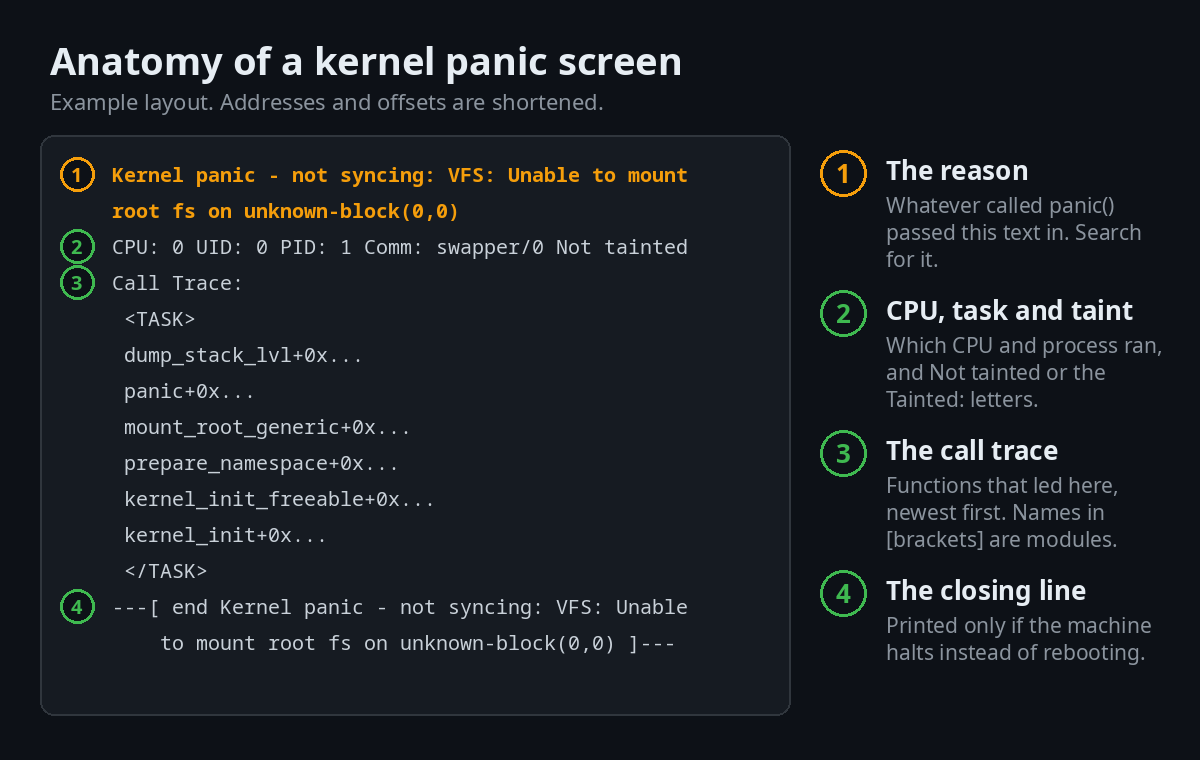
- The panic line.
Kernel panic - not syncing:followed by the reason. The reason is the text that whatever calledpanic()passed in. This is the line to search for and the one the table below explains. - The CPU line. It names the CPU and the task that was running. It also holds the tainted state, either
Not taintedorTainted:followed by letters. - The call trace. The functions that led to the failure, newest first. Names in square brackets are kernel modules. Entries marked with
?may be unreliable guesses, according to the kernel's bug-hunting guide. - The closing line.
---[ end Kernel panic - not syncing: ... ]---. Per the source, the kernel prints it only after the reboot step, so if you see it the machine did not reboot, normally because the panic timeout is 0.
What the tainted letters mean
The kernel marks itself as tainted when something happens that matters later when someone investigates. The flag stays set even after the cause goes away, and bug reports from tainted kernels are often ignored, says the tainted kernels page. A real line looks like Tainted: P W O. You can also read the flags at any time with cat /proc/sys/kernel/tainted.
| Letter | Meaning | What to do with it |
|---|---|---|
P | A proprietary module was loaded | Common with some GPU drivers. Update the driver, or test without it |
O | An out-of-tree module was loaded (built outside the kernel) | DKMS modules are the usual source. Rebuild or remove them |
E | An unsigned module was loaded | Matters if you use Secure Boot |
F | A module was force-loaded (insmod -f) | Someone bypassed a version check |
W | The kernel already issued a warning earlier | Look at the earlier warning in the log |
D | The kernel recently died (oops or BUG) | The panic probably followed an oops. Read that first |
M | A processor reported a machine check exception | Points to hardware |
L | A soft lockup happened earlier | A CPU was stuck. Look for a driver or heat problem |
Panic messages decoded
Each row below comes from the kernel source that prints the message, not from a forum answer. Find your Linux kernel panic message, read what the kernel was doing, then jump to the fix.
| The message | What the kernel was doing | Usual causes | Where it comes from |
|---|---|---|---|
VFS: Unable to mount root fs on unknown-block(0,0) | It never found the root device. The pair (0,0) means the device number is zero, so root= was never resolved | No initramfs. A root=UUID= or root=LABEL= the bare kernel cannot read. The storage driver is a module that was not loaded. A wrong root= | init/do_mounts.c |
VFS: Unable to mount root fs on unknown-block(8,2) (any non-zero pair) | It found the device and tried every filesystem it knows. None accepted it. It prints No filesystem could mount root, tried: and a list | The filesystem driver is missing. rootfstype= is wrong. The filesystem is damaged | init/do_mounts.c |
VFS: Cannot open root device "..." or unknown-block(0,0): error -6 | Printed just before the panic line. Error -6 is ENXIO, "no such device or address". Then it prints Please append a correct "root=" boot option; here are the available partitions: and lists what it can see | Same as the first row. The list tells you which one (see below) | init/do_mounts.c |
No working init found. Try passing init= option to kernel. | The root filesystem mounted, but no program could run as process 1. It tries /init from the initramfs, then init= if you gave one (and stops there if that fails), otherwise /sbin/init, /etc/init, /bin/init and /bin/sh | Missing or broken /sbin/init. Missing libraries. A binary for the wrong architecture. An empty or wrong root partition | init/main.c, init docs |
Requested init /path failed (error -2) | You passed init=/path, the kernel tried to run it itself (it only gets there when there is no working /init in an initramfs), it failed, and the kernel does not fall back to the default list. Error -2 is ENOENT, "no such file" | A typo or a removed file in the init= parameter | init/main.c |
Attempted to kill init! exitcode=0x... | Process 1 exited. The kernel panics because a system cannot run without it. The code is a wait-style status: 0x0000000b is a crash with signal 11, 0x00000100 is a normal exit with status 1 | init crashed, or was replaced by a program that ends (for example init=/bin/false) | kernel/exit.c |
Fatal exception in interrupt | An oops happened while handling an interrupt. On x86 the kernel does not try to continue there, so it always panics | A driver bug or hardware fault. Read the call trace and the Tainted: letters | arch/x86/kernel/dumpstack.c |
Fatal exception | An oops happened and panic_on_oops is set to 1, so the oops was turned into a panic | Same as above. Setting it back to 0 lets the system survive some oopses | arch/x86/kernel/dumpstack.c |
stack-protector: Kernel stack is corrupted in: <function> | The kernel's stack check failed. The function named after in: is where it was caught | A bug in that function or in a module that calls it. Update the kernel and modules | kernel/panic.c |
kernel: panic_on_warn set ... | A warning happened and panic_on_warn is 1 | Someone enabled it, often on purpose in a test or cluster | kernel/panic.c |
sysrq triggered crash | Someone wrote c to /proc/sysrq-trigger or pressed the key combination | Deliberate. It is the standard way to test crash dumps | drivers/tty/sysrq.c |
The two kinds of "Unable to mount root fs"
This is the most searched panic message, and the number in brackets decides what to do. (0,0) means the kernel never identified the disk. Any other pair means it did, and the filesystem is the problem.
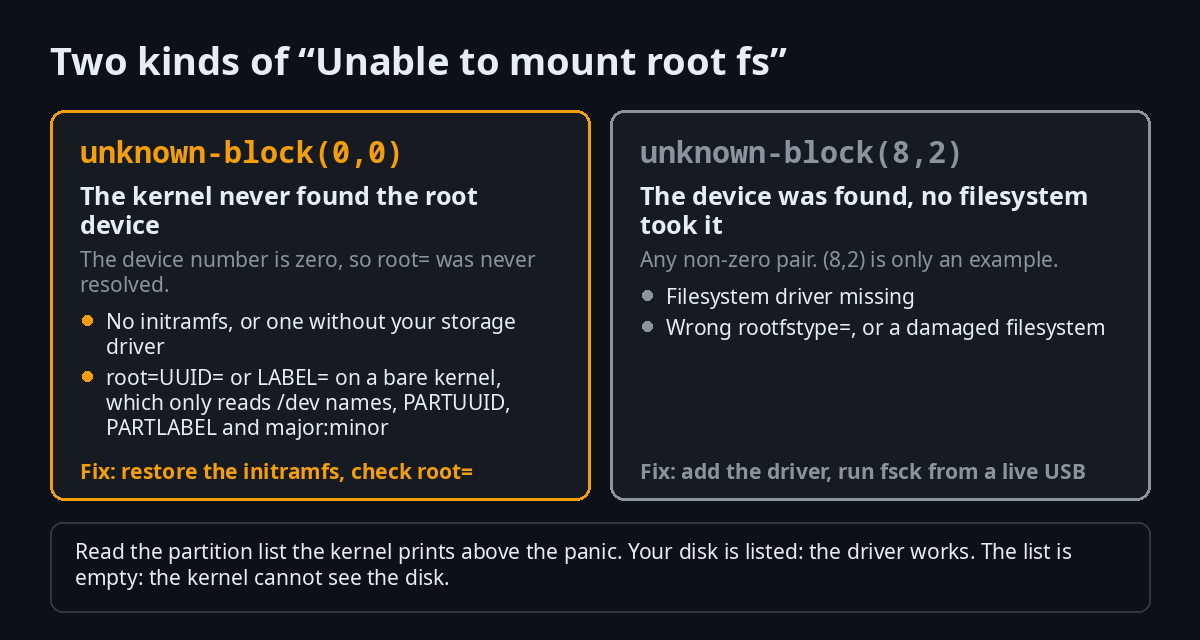
When the kernel prints the partition list above the panic, read it. If your disk and its partitions are listed, the driver works and root= or the filesystem is the problem. If the list is empty or missing your disk, the kernel cannot see the disk at all, which usually means the storage driver is not available at that stage. That is the initramfs's job, and the fix is to rebuild it.
Why a perfectly good disk can give (0,0)
The kernel can resolve only a few forms of root= on its own: /dev/... names, PARTUUID=, PARTLABEL=, major:minor numbers and hexadecimal device numbers. It does not understand UUID= or LABEL=, according to block/early-lookup.c.
Most distros write root=UUID=... and let the initramfs translate it. Remove or break the initramfs and the kernel is left alone with a line it cannot read. It prints unknown-block(0,0) even though the disk is healthy.
How to fix a Linux kernel panic
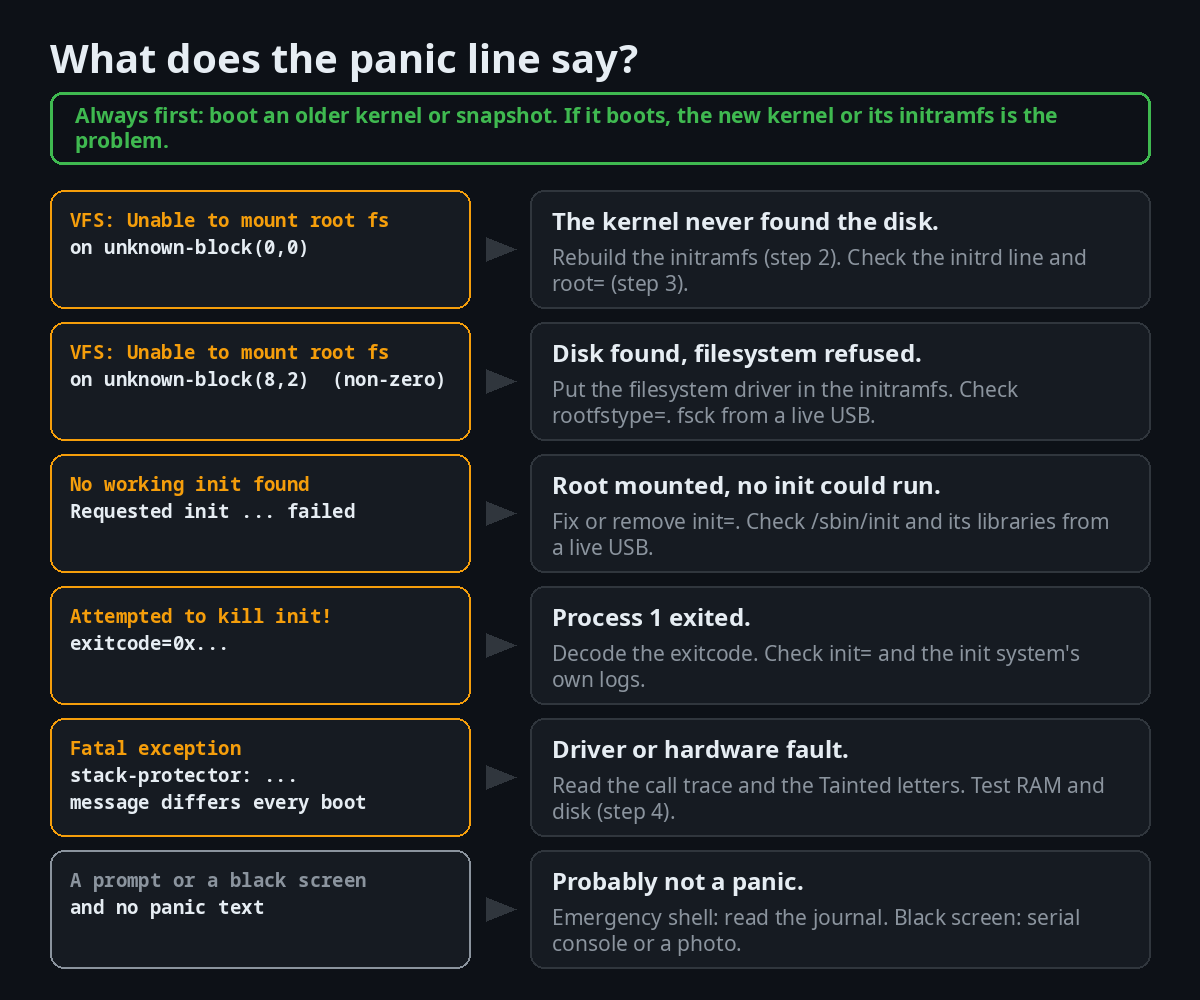
Go from the least invasive step to the most. Stop when the machine boots. The chart shows which step your message points to.
Step 1: Boot something that worked
If the panic started after an update, an older kernel or snapshot usually still exists. Booting it changes nothing on disk, and it tells you whether the new kernel is at fault.
With GRUB, a hidden menu appears if you press Esc or F4, or hold Shift, during the timeout, as the GRUB manual describes. Pick Advanced options and an older kernel. To change parameters for one boot, press e on an entry, edit the lines, and boot with Ctrl-x. Esc cancels the edit, and nothing is saved.
| System | How to boot a working state | Rebuild the initramfs | Rebuild the boot menu |
|---|---|---|---|
| Debian, Ubuntu | GRUB, Advanced options, an older kernel | update-initramfs -u -k all (man page) | update-grub |
| Fedora, RHEL family | GRUB, an older kernel. DNF keeps three kernels by default (installonly_limit) | dracut -f --regenerate-all (man page) | grub2-mkconfig -o /boot/grub2/grub.cfg |
| Arch | Arch replaces the kernel on each update, so there is no older one unless you also installed linux-lts (it is in core). Pick it in the boot menu | mkinitcpio -P (man page) | grub-mkconfig -o /boot/grub/grub.cfg |
| NixOS | Every configuration change adds a boot menu entry, so pick an earlier generation. From a running system: nixos-rebuild switch --rollback (man page) | Built with the system. nixos-rebuild boot builds the configuration and makes it the boot default | NixOS writes it |
| Fedora Atomic (Silverblue, Kinoite, Bazzite) | rpm-ostree rollback swaps the default and the previous deployment. Two are kept by default (rpm-ostree handbook) | Not applicable, the image ships with it | Not applicable |
| Omarchy | Pick a snapshot in the Limine menu. Omarchy makes one on every update. Then omarchy-snapshot restore (Omarchy manual) | mkinitcpio -P (Omarchy is Arch-based) | Snapshot booting only works with the Limine boot loader, not GRUB or systemd-boot |
The Omarchy restore puts back the system, not your home folder, and it keeps your ~/.config as it is. It fixes a broken update. It does not recover deleted files. Our Timeshift guide covers snapshots on other distros.
GNOME OS Preview follows the same two-versions idea: it keeps two system images and, according to its user guide, lets you pick the older one in the boot menu. Our GNOME OS Preview guide shows how its updates work.
Step 2: Rebuild the initramfs from a live USB
The initramfs is a small image the kernel unpacks into memory at boot. Its job, per the dracut manual, is to let early boot load the storage drivers, find and mount the root filesystem and start the real system. If it is missing, damaged or lacks your storage driver, you get unknown-block(0,0). The fix is to rebuild it from a live system.
- Boot a live USB of any recent distro and open a terminal.
- Find your partitions.
lsblk -fshows the filesystems and their names. Note the root partition and the boot or EFI partition. - Open encrypted or LVM storage first, if you use it.
sudo cryptsetup open /dev/nvme0n1p3 cryptrootfor LUKS, andsudo vgchange -ayfor LVM. - Mount root, then the boot partitions. If root is a Btrfs subvolume, add
-o subvol=NAME.sudo mount /dev/sda2 /mnt # your root partition sudo mount /dev/sda1 /mnt/boot/efi # the EFI partition (some systems use /mnt/boot) - Enter the installed system. On Arch and Omarchy,
arch-chrootmounts/dev,/proc, the other API filesystems andresolv.conffor you (man page):sudo arch-chroot /mntOn other distros, bind the same filesystems yourself:
for d in dev proc sys run; do sudo mount --rbind /$d /mnt/$d; done sudo chroot /mnt - Run your distro's rebuild commands from the table above, then the boot menu command.
- Leave and reboot.
exit, thensudo umount -R /mnt, then reboot without the USB.
Step 3: Check the root= line and the boot entry
If the initramfs is fine, look at the entry itself. Press e in GRUB and find the line that starts with linux (or linuxefi on some systems). Check three things:
- Is there an
initrdline below it and does it name a file that exists in/boot? A missing line gives the bare-kernel case from the previous section. - Does
root=match your disk? Compare it withlsblk -ffrom a live USB. A partition that was reinstalled or reformatted gets a new UUID. - Does the disk appear late? USB and slow storage can show up after the kernel looks for them.
rootwaitmakes the kernel wait for the root device, androotdelay=Nwaits N seconds first. Both are handled in init/do_mounts.c.
Edits in the GRUB editor last for one boot. To make a change permanent on Debian or Ubuntu, edit GRUB_CMDLINE_LINUX in /etc/default/grub and run update-grub.
Step 4: When it is the hardware
Software causes repeat the same message. Hardware causes tend to look different every time: another message, another function in the trace, sometimes a panic that never repeats. That is a rule of thumb, not proof, but it is a useful first split.
Can bad RAM cause a kernel panic? Yes. The kernel's RAS documentation says that when an uncorrectable memory error hits a critical component such as kernel memory, the only reliable way to avoid data corruption is to hang or reboot the machine, and EDAC can be set to panic on those errors. Corrected errors are usually not fatal, and the system keeps running.
- Memory: boot MemTest86+ from a USB stick and let it finish several passes. Remove one module at a time if it reports errors.
- Disk:
sudo smartctl -a /dev/nvme0n1(or/dev/sda) from the smartmontools package shows the drive's own health report. - Heat:
sensorsfrom lm-sensors, and a dust-free fan, rule out thermal trouble. - A module that taints the kernel: if the trace names a module marked with
PorO, boot without it.
Step 5: Virtual machines and cloud servers
In a VM or a cloud instance you have no screen, so the serial console is your screen. Google Cloud documents the sequence for a VM that panics at boot: open the serial console and read the panic line near the end of the log, reset the VM, pick the earlier kernel in GRUB, and once it is reachable regenerate the initramfs and rebuild the GRUB configuration. Its example for RHEL-style images is dracut -f /boot/initramfs-KERNEL_VERSION.img KERNEL_VERSION followed by grub2-mkconfig -o /boot/grub2/grub.cfg (Google Cloud guide). The listed causes are the same ones from this guide: a missing initramfs, a partly written one, or a boot entry that does not point to it.
On your own machine, our VirtualBox guide shows how to set up a test VM where you can break and repair a boot safely.
Where did the log go?
After a reboot, the panic text is usually not where you expect. The reason is in how a panic works: the kernel stops the other CPUs and then reboots or halts, so userspace programs such as the journal daemon get no chance to write the panic line. The journal usually keeps what was logged before it, not the panic itself.
| Method | What it captures | What it needs | Limits |
|---|---|---|---|
| A photo of the screen | The text on screen | A phone | Only the last screen, and long traces scroll off |
journalctl -k -b -1 | Kernel messages from the previous boot, up to the crash | A persistent journal. Storage= defaults to persistent, per journald.conf(5) | Usually misses the panic text itself |
| pstore / ramoops | A dump of the kernel log at panic or oops time, as files named dmesg-ramoops-N | Persistent RAM that survives a restart, reserved through module parameters, a device tree node, platform data or the reserve_mem boot parameter (ramoops docs) | Not on every machine. New dumps can overwrite old ones. systemd-pstore.service archives what it finds to the journal and, optionally, /var/lib/systemd/pstore/ |
| kdump | The whole memory image (vmcore) and the log | Reserved memory (crashkernel=), kexec-tools, a capture kernel (kdump docs) | You set it up beforehand. Analysis needs debug symbols |
| netconsole | Kernel messages sent over UDP to another machine | A network card, a receiving machine and the netconsole= parameter (netconsole docs) | Built in, it cannot capture very early panics. Ethernet and IP only |
| Serial console | Everything the kernel prints, live | A serial port or a VM or cloud serial console | Needs console= set before the crash |
| DRM panic screen | The panic text drawn on a graphical screen, optionally as a QR code | Kernel 6.10 or newer, and a graphics driver that supports it | See the next section. Not every distro kernel has it |
For everyday log reading outside crashes, see our journalctl and /var/log guide.
Set up your machine before the next panic
A panic you cannot read is a panic you cannot fix. These settings cost nothing and make the next one easy.
Kernel settings that control a panic
All of these are documented in the kernel sysctl reference.
| Setting | What it does | Values |
|---|---|---|
kernel.panic | What happens after a panic | 0 loop forever, N reboot after N seconds, negative reboot at once |
kernel.panic_on_oops | Turn every oops into a panic | 0 try to continue, 1 panic (and reboot if kernel.panic is non-zero) |
kernel.panic_on_warn | Panic after printing a WARN() location | 0 only warn (default), 1 panic |
kernel.panic_print | Extra information printed during a panic | A bitmask: tasks, memory, timers, locks, ftrace buffer, console replay, all-CPU backtrace, blocked tasks |
kernel.softlockup_panic, kernel.hardlockup_panic | Panic when a CPU is stuck | 0 or 1 |
kernel.hung_task_panic | Panic when tasks hang | 0 (default) or the number of hung tasks that triggers it |
Try one for the current boot with sudo sysctl kernel.panic=10. To keep it, put the line kernel.panic = 10 in a file such as /etc/sysctl.d/90-panic.conf.
Be careful with automatic reboots. A machine that panics every time it boots and reboots after ten seconds will loop, and the panic text will flash past before you can read it. Set it on servers you cannot reach, not on the laptop you are debugging.
kdump on Ubuntu and Fedora
kdump saves the memory of a crashed kernel by starting a second, small kernel from reserved memory (kernel docs).
- Ubuntu:
sudo apt install kdump-tools. The settings live in/etc/default/kdump-tools,kdump-config showshould report ready to kdump, and dumps go to/var/crash. From Ubuntu 24.10 it is enabled by default on installs with at least 4 CPU threads, between 6 GB and 2 TB of RAM and enough free space in/var(Ubuntu documentation). - Fedora: install
kexec-tools, reserve memory withkdumpctl reset-crashkernel(Fedora 35 and newer), thensystemctl enable kdump.serviceand reboot. Dumps go to/var/crash. The Fedora wiki page is from 2021, so checkkdumpctlon your release.
To test it, you crash the machine on purpose. The kernel documentation gives echo c > /proc/sysrq-trigger for that, and the sysrq page says a write to that file is always allowed for an administrator. Save your work and run sync first: the test really does crash the machine.
The panic screen with a QR code
Linux 6.10 added DRM panic, a panic screen drawn by the graphics stack so you can read a panic on a graphical console. A QR code panic screen followed in 6.12 (Phoronix). The QR code carries the last lines of the kernel log, so you can scan it and report the panic without typing it out.
It has conditions. The QR screen is written in Rust, so the kernel must be built with Rust (the Kconfig option DRM_PANIC_SCREEN_QR_CODE depends on DRM_PANIC and RUST), it has to be selected with DRM_PANIC_SCREEN, and the graphics driver must support DRM panic. Whether your distro's kernel has it is something to check, not assume: zcat /proc/config.gz | grep DRM_PANIC tells you.
Keep a way back
Most of the fixes above get easier if you prepared a retreat before the update.
- Keep a second kernel. Fedora keeps three by default. On Arch, install
linux-ltsnext tolinux. - Take a snapshot before big updates. Omarchy does it for you. On other distros, our Timeshift guide shows how.
- Check space in
/bootbefore a kernel update.df -h /boottakes a second. Google Cloud lists a partly written initramfs among the causes of a boot panic, and running out of space while it is written is one way to get one. - Keep a live USB at hand. You need it for step 2, and making one on a machine that does not boot is the slow way.
Break your boot on purpose, safely
The fastest way to learn these messages is to cause them. Do it in a virtual machine so a mistake costs nothing (our VirtualBox guide sets one up), or on a spare PC. Edits made in the boot menu last for one boot, so a reboot undoes all four experiments.
The results below are what the kernel source and documentation say should happen. Your distro's initramfs can change some of them, and noticing the difference is part of the exercise. If your result is different, write to contact@tuxai.dev.
Experiment 1: a panic with sysrq
This is the cleanest panic to study, and the one the kernel documentation uses to test crash dumps. Save your work first, because it really crashes the machine.
cat /proc/sys/kernel/panic        # 0 means it will halt, N means it reboots after N seconds
sync
echo c | sudo tee /proc/sysrq-trigger
What the source says you will see: the line sysrq: Trigger a crash, then Kernel panic - not syncing: sysrq triggered crash and a call trace (drivers/tty/sysrq.c calls panic() directly). With a panic timeout of 0 the machine stops and prints the closing end Kernel panic line. With a positive timeout it reboots after that many seconds.
What to do next: after the restart, look for the panic text in every place from the log table and compare with what you expected. What survives depends on your setup, and most people are surprised by how little it is.
Experiment 2: boot without the initramfs
In the GRUB menu press e on your normal entry, delete the line that starts with initrd, and boot with Ctrl-x.
What the source says you will see: if the entry uses root=UUID=... or root=LABEL=..., the kernel cannot read it. Expect VFS: Cannot open root device ... error -6, then Please append a correct "root=" boot option; here are the available partitions:, and finally Kernel panic - not syncing: VFS: Unable to mount root fs on unknown-block(0,0). The partition list is the clue. On many distro kernels the storage driver is a module, so the list is empty.
It can also behave differently. If your kernel has the storage and filesystem drivers built in and root= uses a form the kernel understands, such as PARTUUID=, it may boot without an initramfs at all.
Experiment 3: make process 1 end
Press e, add init=/bin/false to the end of the line that starts with linux, and boot with Ctrl-x.
What the source says you will see: if your initramfs hands control to the program named by init=, that program is false, which ends at once with status 1. The kernel then prints Kernel panic - not syncing: Attempted to kill init! exitcode=0x00000100. The status is shifted left by eight bits, so 1 appears as 0x100. If the system boots normally, your initramfs ignores init=, which is worth knowing too.
Experiment 4: a wrong root= is not always a panic
Press e, change root=... to root=/dev/doesnotexist, and boot.
What to expect: with an initramfs, it is the initramfs that looks for the root device, not the kernel. On most distros that means a wait and then an emergency shell, not a Kernel panic line. Compare it with experiment 2: the difference between a panic and an emergency shell is whether an initramfs ran first.
Troubleshooting a Linux kernel panic: common questions
How do you fix a kernel panic?
Boot an older kernel or snapshot first, then read the line after not syncing:. If it names the root filesystem, rebuild the initramfs from a live USB and check the root= line. If the message changes every time, test the RAM and the disk. The steps and commands for each distro are in the sections above.
What does "Kernel panic - not syncing" mean?
It means the kernel hit an error it cannot recover from and stopped without flushing disk buffers. The text after the colon is the actual cause. Kernel panic - not syncing: VFS: Unable to mount root fs on unknown-block(0,0) is the most common one, and it means the kernel never found the root device.
Can faulty RAM cause a kernel panic?
Yes. The kernel documentation states that an uncorrectable memory error in a critical component, such as kernel memory, leaves hanging or rebooting as the only safe response, and EDAC can be set to panic on those errors. Corrected errors are usually not fatal. Test with MemTest86+ if your panics vary from boot to boot.
What triggers a kernel panic?
Anything that calls panic(): no usable root filesystem, process 1 exiting, an oops in an interrupt, an oops with panic_on_oops set, a warning with panic_on_warn set, a lockup with a lockup panic setting enabled, a corrupted kernel stack, an uncorrectable hardware error, or a deliberate sysrq crash.
Where are kernel panic logs stored?
Often nowhere. The journal keeps what came before the panic but usually not the panic line. pstore, kdump, netconsole and a serial console are the ways to keep it, and each needs setting up beforehand. See the table in where did the log go.
Why does my Linux kernel panic after an update?
A common reason is that the new kernel's initramfs is missing, incomplete or built without your storage or filesystem driver. Boot the previous kernel, rebuild the initramfs for the new one, and rebuild the boot menu. A driver your storage needs and that is built out of tree, such as one installed through DKMS, may also be missing from the new initramfs if it was not built for the new kernel.
What is the difference between a kernel panic and a kernel oops?
An oops is the kernel reporting a bug, usually with a stack trace, and often carrying on. A panic is the kernel stopping. An oops becomes a panic if panic_on_oops is 1, or if it happens in an interrupt.
Should I make Linux reboot automatically after a panic?
On a server you cannot reach, yes: set kernel.panic to a number of seconds. On a machine you are debugging, no, because a boot-time panic will loop and you will not be able to read it. The kernel's own documentation says a positive value reboots after that many seconds and zero loops forever.
Does a kernel panic mean my hardware is dying?
Not necessarily. Many panics are software: a bad initramfs, a wrong root= line or a driver bug. Hardware is likelier when messages differ from boot to boot, when memory or machine check errors appear, or when the same machine panics under load but not at idle.
Sources and further reading
- Kernel documentation: sysctl kernel, kdump, ramoops, sysrq, bug hunting, init, netconsole, tainted kernels, RAS
- Kernel source: kernel/panic.c, init/do_mounts.c, init/main.c, kernel/exit.c, block/early-lookup.c, arch/x86/kernel/dumpstack.c, drivers/tty/sysrq.c
- Tools: dracut(8), mkinitcpio(8), arch-chroot(8), update-initramfs(8), nixos-rebuild, rpm-ostree handbook, systemd-pstore.service(8), journald.conf(5), GRUB manual
- Distro guides: Ubuntu kernel crash dump, Fedora kdump, Omarchy system snapshots, Google Cloud: Linux VM boot failures from a kernel panic
Next in this series: choose and install a distro with the Linux distros hub, or learn the essential commands you used above.

JM Carreira
I’ve used Linux since 2008 and it has been my main system since 2021. When an article has a “Tested on” box, I ran the steps on my Lenovo Tiny. More about me and the test machine.