
Void Linux: The Complete Guide
Void Linux is an independent, rolling-release Linux distribution that was written from scratch instead of being built on top of Debian, Arch or Fedora. It has its own package manager (XBPS), uses runit instead of systemd to start and supervise services, and lets you choose between two C libraries: the usual glibc or the smaller musl. It is run by a small team of volunteers, and its own documentation describes it as stable enough for daily use.
This page is the starting point for everything tuxai.dev has published about Void. It explains what Void is, who it suits and who should pick something else, which download to choose, and how its main pieces work. Each section links to the full guide when there is one. All versions, dates and package counts below were checked against voidlinux.org, the Void Handbook, the official mirror and the void-packages repository on 14 October 2026.
Void Linux at a glance
| Item | Void Linux |
|---|---|
| Based on | Nothing. Independent, not a fork of another distribution |
| Release model | Rolling release, with a stated focus on stability over the newest versions |
| Init system | runit (systemd was dropped in July 2014) |
| Package manager | XBPS, written for Void, BSD 2-clause licence. Latest release 0.60.7 |
| C library | glibc or musl, chosen at install time |
| Architectures | x86_64, i686, aarch64, armv7l, armv6l |
| Packages | 9,709 source templates, 15,156 package names counting subpackages (void-packages, 14 October 2026) |
| Default kernel | Linux 6.18 (the linux meta package) |
| Install images | Base (command line) and Xfce, dated 2 February 2025 |
| Minimum hardware | 520 MB of RAM and 700 MB of disk for a glibc base install (600 MB with musl) |
| First commit | 26 September 2008 (void-packages) |
Void Linux guides on tuxai.dev
Start with the install guide if you have never used Void. The other two pieces cover the package manager and the most recent news about the project.
Start here: install Void Linux
The full installation: glibc or musl, the void-installer menus, first boot, runit services, disk encryption and a manual chroot install for Arch users.
XBPS, the package manager
The commands you use every day, how repositories work, xbps-src as Void's answer to the AUR, and service logs without journalctl.
News: the AI policy dispute
Why a maintainer orphaned 113 packages in September 2026, what Void's contribution policy actually says, and what is at risk.
What makes Void Linux different?
Void is different because almost every core piece was chosen or written by the project itself. Most distributions you have heard of start from Debian, Ubuntu, Arch or Fedora. Void started from an empty repository in 2008 and still keeps its own package manager, its own build system and its own installer.
Four decisions define it:
- Its own package manager. XBPS installs, updates and removes binary packages, and it checks during updates that a library is not replaced by an incompatible version that would break other packages. The same project wrote xbps-src, which builds packages from source inside containers without needing root.
- runit instead of systemd. Void moved from systemd to runit in July 2014. runit starts services and restarts them if they fail, and each service is a small folder with a
runscript. The Handbook gives a practical reason for the choice: runit is what makes musl possible as a second C library, which systemd would not allow. - Two C libraries. Every compatible package exists twice, once linked against glibc and once against musl. musl is smaller and follows the standards strictly, which is why some software needs patches to build against it.
- Rolling, but careful. There are no version numbers like "Void 6". You install once and update. Software reaches the repository soon after a change is merged, but the project says openly that it prefers stability to being first.
That last point is visible in the repository. On 14 October 2026 the kde-plasma package was at 6.7.4 and firefox at 157.0.1, both recent, while gnome was still at 48.0. Desktop components move at the pace of whoever maintains them.
Is Void Linux right for you?
Void suits people who already know their way around a Linux terminal and want a small, fast system they understand piece by piece. It is a poor first distribution. Nothing is hidden, but nothing is set up for you either.
| You are... | Void is a good fit? | Why |
|---|---|---|
| New to Linux | No | No graphical installer, no app store set up, and you add services by hand. Linux Mint is a better start. |
| An Arch user tired of systemd | Yes | Same do-it-yourself approach, simpler init, a fast package manager and a manual install path that feels familiar. |
| Reviving an old PC | Yes, with care | 520 MB of RAM is enough for a base system, and there are still 32-bit (i686) images. You choose a light desktop yourself. |
| A gamer | Possible, not ideal | Steam works on glibc with two extra repositories enabled. A distribution built for gaming, like CachyOS, saves you the setup. |
| Running servers or containers | Yes | Small base, rootfs tarballs for chroots and containers, and runit services are easy to read and audit. |
| Dependent on NVIDIA's proprietary driver | Only with glibc | The proprietary NVIDIA driver does not support musl, according to the Handbook. |
If you are comparing Void with other distributions that are not based on anything else, our overview of independent Linux distributions puts it next to NixOS, Slackware, Alpine and the rest.
glibc or musl: which Void Linux should you install?
Choose glibc unless you have a specific reason to want musl. glibc is what almost all Linux software is built and tested against, and it is the only option for Steam, the proprietary NVIDIA driver and most closed-source programs.
- glibc is the safe default for a desktop or a laptop. It also gives you the multilib repository, which holds the 32-bit libraries games need. That repository only exists for x86_64 with glibc.
- musl makes sense if you want a smaller, stricter system and you know that every program you need is in the Void repositories. When something is missing, the options are a Flatpak or a glibc chroot.
The decision is hard to undo, because changing it means reinstalling. The install guide goes through the trade-offs in more detail before you download anything.
Which Void Linux image should you download?
For a normal 64-bit PC, download void-live-x86_64-20250202-xfce.iso if you want a desktop straight away, or the base image if you prefer to build your own. Both come from repo-default.voidlinux.org/live/current, and each release folder includes the checksum file and its signature.
| Image | For | Size | Installer |
|---|---|---|---|
| x86_64 Xfce (glibc) | Most PCs and laptops, desktop included | 1.45 GB | void-installer |
| x86_64 base (glibc) | Building your own desktop or a server | 1.08 GB | void-installer |
| x86_64 Xfce (musl) | A musl desktop | 1.43 GB | void-installer |
| x86_64 base (musl) | A minimal musl system | 1.06 GB | void-installer |
| i686 Xfce / base (glibc only) | 32-bit PCs with SSE2 (Pentium 4 or newer) | 1.40 / 1.02 GB | void-installer |
| aarch64 Xfce / base | UEFI ARM machines | 1.50 / 1.17 GB | Not supported, manual install |
| Asahi Xfce / base | Apple Silicon Macs | 1.15 / 0.83 GB | Not supported, manual install |
| Raspberry Pi .img.xz | Pi boards (armv6l, armv7l, aarch64) | 0.11 to 0.37 GB | Write to the SD card |
Sizes are taken from the file listing on the official mirror. One detail confuses many first-time users: the newest images are from 2 February 2025, more than a year and a half old in October 2026. That is normal for a rolling distribution. The image is only a way in. The first thing you do after installing is update, and from then on you are on the current packages.
If you pick the Xfce image, choose Local as the installation source. With Network, the installer downloads a fresh base system and leaves the desktop out. Both live images log in as anon or root with the password voidlinux.
Which desktops does Void Linux support?
Void only ships install images with Xfce, but KDE Plasma, GNOME and most window managers are in the official repositories. The project limits the images to Xfce to keep testing manageable, not because other desktops are unsupported.
To get a different desktop, install the base image and then add what you want. The Handbook has dedicated sections for KDE and GNOME, plus Wayland, Xorg, PipeWire and graphics drivers for AMD, Intel and NVIDIA. Tiling window managers and Wayland compositors such as Sway are packaged too, and a base install gives them a clean system with nothing running that you did not add.
How do services work in Void Linux?
A service runs in Void when its folder from /etc/sv/ is linked into /var/service/. That link is the whole "enable" step, and removing it disables the service.
# enable and start the SSH server
sudo ln -s /etc/sv/sshd /var/service/

# check it
sudo sv status sshd

# stop it for now, or disable it for good
sudo sv down sshd
sudo rm /var/service/sshd
Each service folder contains a run script and, optionally, a conf file for options and a log folder. There is no journal: logging is set up per service or through a syslog daemon. The XBPS guide explains how to read service logs without journalctl.
How does package management work?
XBPS handles everything with a few short commands, and all of them are covered in depth in our guide to Void's package manager. The four you will use most:
sudo xbps-install -Su        # update the whole system
sudo xbps-install firefox    # install a package
xbps-query -Rs editor        # search the repositories
sudo xbps-remove -R firefox  # remove a package and its unused dependencies
Besides the main repository, Void has optional ones that you enable by installing a package:
void-repo-nonfreefor software with non-free licences, such as Steam.void-repo-multilibfor 32-bit libraries on 64-bit glibc systems.void-repo-multilib-nonfreefor non-free 32-bit packages.void-repo-debugfor debugging symbols.
Void has no equivalent of the AUR where anyone can publish a build script. What exists is xbps-src, which builds packages from the official templates or from your own. For desktop apps that are not packaged, Flatpak is the usual answer, and our comparison of Snap, Flatpak and AppImage explains the trade-offs.
Can you game on Void Linux?
Yes, on the glibc edition. Steam is in the nonfree repository for x86_64 and i686, and it needs the 32-bit libraries from multilib, so both repositories have to be enabled first:
sudo xbps-install void-repo-nonfree void-repo-multilib void-repo-multilib-nonfree
sudo xbps-install -S steam
On musl, the native Steam package is not an option, because multilib does not exist for musl and Steam is built for glibc. The Flatpak version is the way around it. You will also need the 32-bit graphics drivers for your card from multilib. If gaming is the main reason you are switching, a distribution tuned for it will give you less work.
Void Linux vs Arch, Artix and Alpine
Void is most often compared with Arch, because both expect you to build your own system. The table puts it next to the three distributions people weigh it against.
| Distribution | Based on | Init | Package manager | C library | Community packages |
|---|---|---|---|---|---|
| Void Linux | Independent | runit | XBPS | glibc or musl | No user repository, xbps-src templates |
| Arch Linux | Independent | systemd | pacman | glibc | AUR |
| Artix Linux | Arch | OpenRC, runit, s6 or dinit | pacman | glibc | AUR (with care) |
| Alpine Linux | Independent | OpenRC | apk | musl | testing and community repositories |
In practice: if you want Arch without systemd and need the AUR, Artix is closer to what you know. If you want a system that is not tied to Arch's decisions at all, Void is the more coherent option. Alpine is the choice for containers and very small servers. For a completely different idea of how a distribution should work, look at NixOS.
A short history of Void Linux
Void began in 2008, when the first recipes of void-packages went into Git. XBPS followed in 2009. The site still credits the original work to Juan Romero Pardines ("Juan RP") for 2008 to 2018. Since then the project has been run by a team of volunteers, and in 2018 it began managing its GitHub permissions with Terraform so that changes in who has access are public.
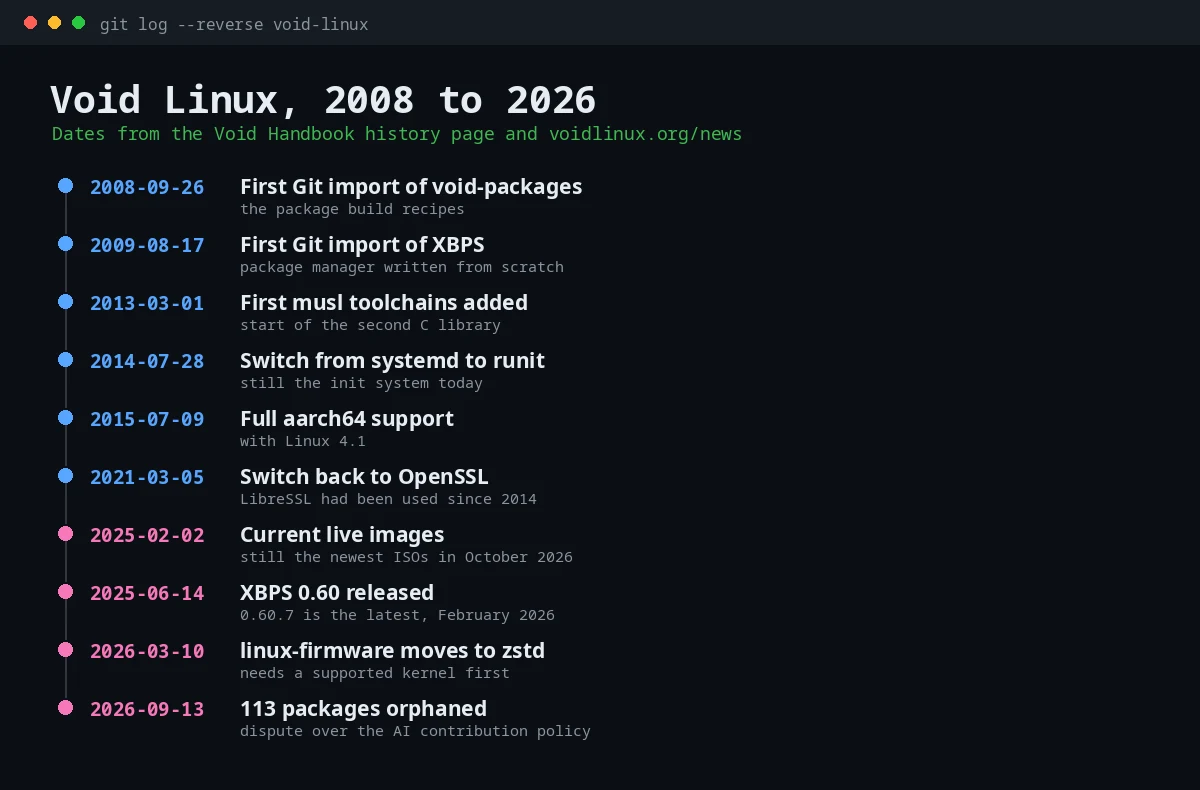
The project is small but active. void-packages, the repository with every package recipe, had 3,456 stars and 2,820 forks on GitHub on 14 October 2026, with new commits pushed that same day. Its rules are also strict: in September 2026 a maintainer left 113 packages without an owner after a pull request was rejected under the AI contribution policy, a story we cover in Void's AI policy dispute.
Troubleshooting Void Linux: Common Questions
Is Void Linux good for beginners?
Not as a first distribution. The installer is a text menu, services are enabled by hand and the desktop needs setting up yourself. If you already use Linux and want to learn how the system works underneath, it is a good place to do it.
What shell does Void Linux use?
Void installs both dash and bash in the base system. dash provides /bin/sh for scripts, and bash is available as an interactive shell. Run echo $SHELL to see your login shell and chsh -s /bin/bash to switch to bash.
How do I enable a service in Void Linux?
Create a symbolic link from the service folder to /var/service, for example sudo ln -s /etc/sv/sshd /var/service/. runit starts it within a few seconds. Delete the link to disable it.
Is Void Linux okay for gaming?
Yes, with the glibc edition. Enable the nonfree and multilib repositories and install Steam with xbps. On musl, use the Flatpak version of Steam instead.
How do I install Void Linux with Xfce?
Download the Xfce live image, boot it, run sudo void-installer and choose Local as the source so the desktop is copied to disk. The step-by-step install guide covers every menu.
Why is the Void Linux ISO from 2025?
Because Void is rolling and the image is only used to install. The newest images are from 2 February 2025. After installing, run sudo xbps-install -Su and the system is up to date.
Does Void Linux use systemd?
No. Void switched from systemd to runit in July 2014 and has used runit ever since, both to boot the system and to supervise services.
Is Void Linux stable?
Its developers say it is stable enough for daily use, and the project puts stability ahead of shipping the newest versions. As with any rolling distribution, read the news page before big updates. The firmware change in March 2026, for example, required a supported kernel first.
Is there a Void Linux wiki?
The official documentation is the Void Handbook at docs.voidlinux.org. It can also be installed offline with the void-docs package. There is no wiki on the scale of the ArchWiki, and much of the ArchWiki still applies to Void as long as you translate the systemd parts.
How many packages does Void Linux have?
On 14 October 2026 void-packages contained 9,709 source templates, which become 15,156 installable package names once subpackages are counted. The real number available depends on your architecture and C library.
Sources
- voidlinux.org, home page, downloads and news
- The Void Linux Handbook: About, History, Installation, Live Installers, musl, Services and Daemons, Repositories
- Official mirror, live/current (file names, dates and sizes)
- void-linux/void-packages on GitHub (package templates for linux, kde-plasma, gnome, firefox, steam, base-system and dash)
- XBPS releases on GitHub
- void-mklive, the source of the installer